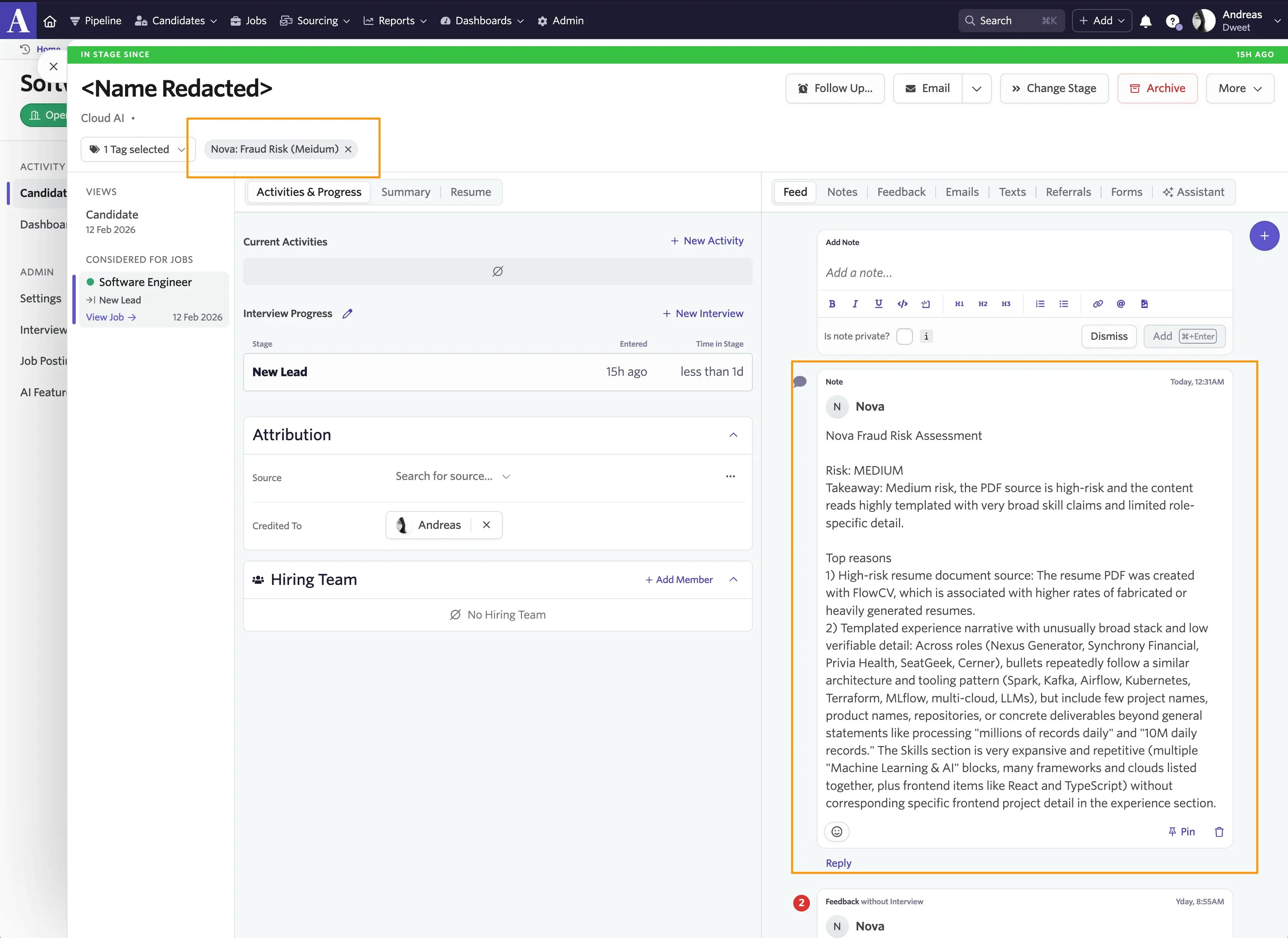
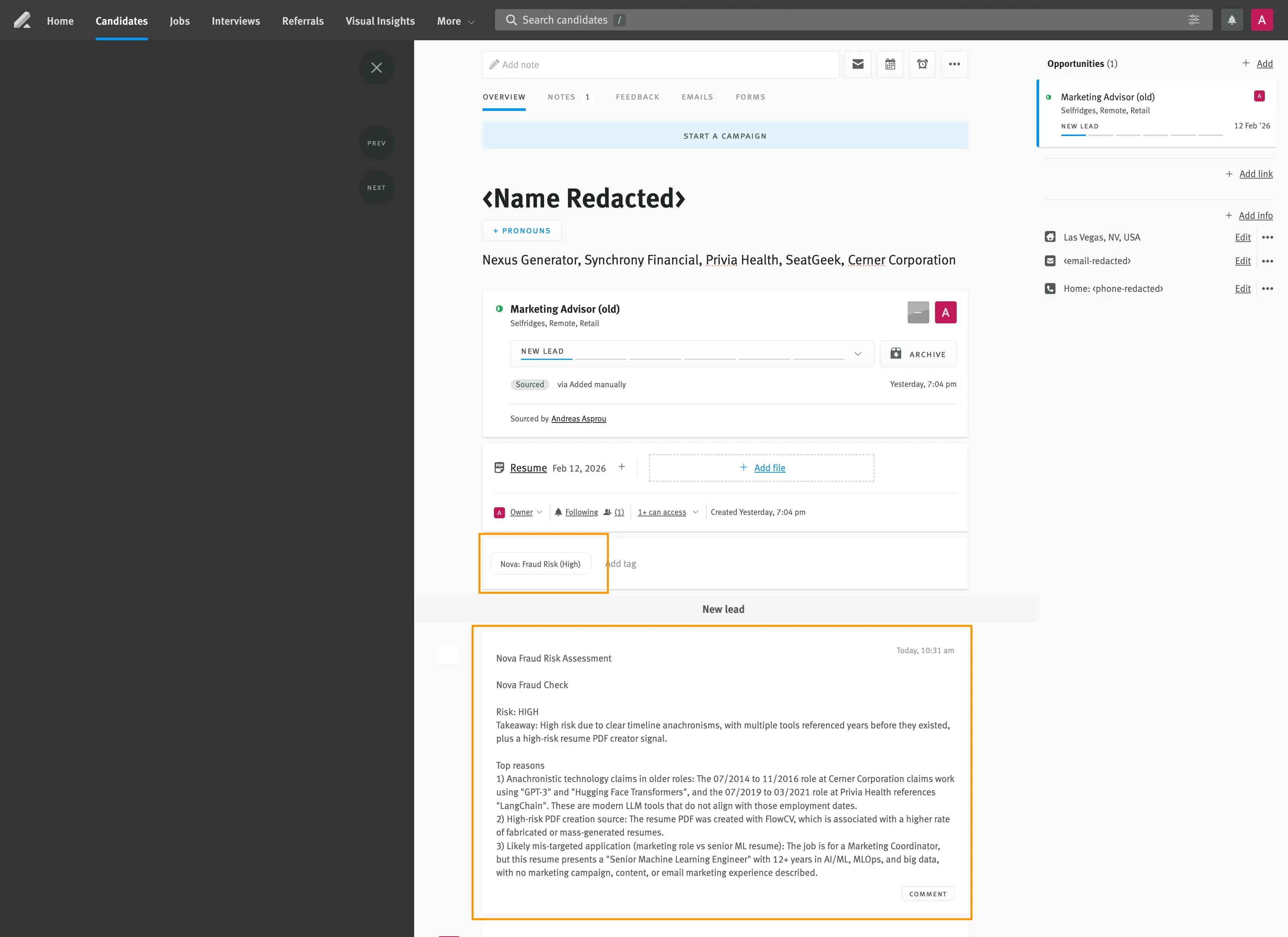
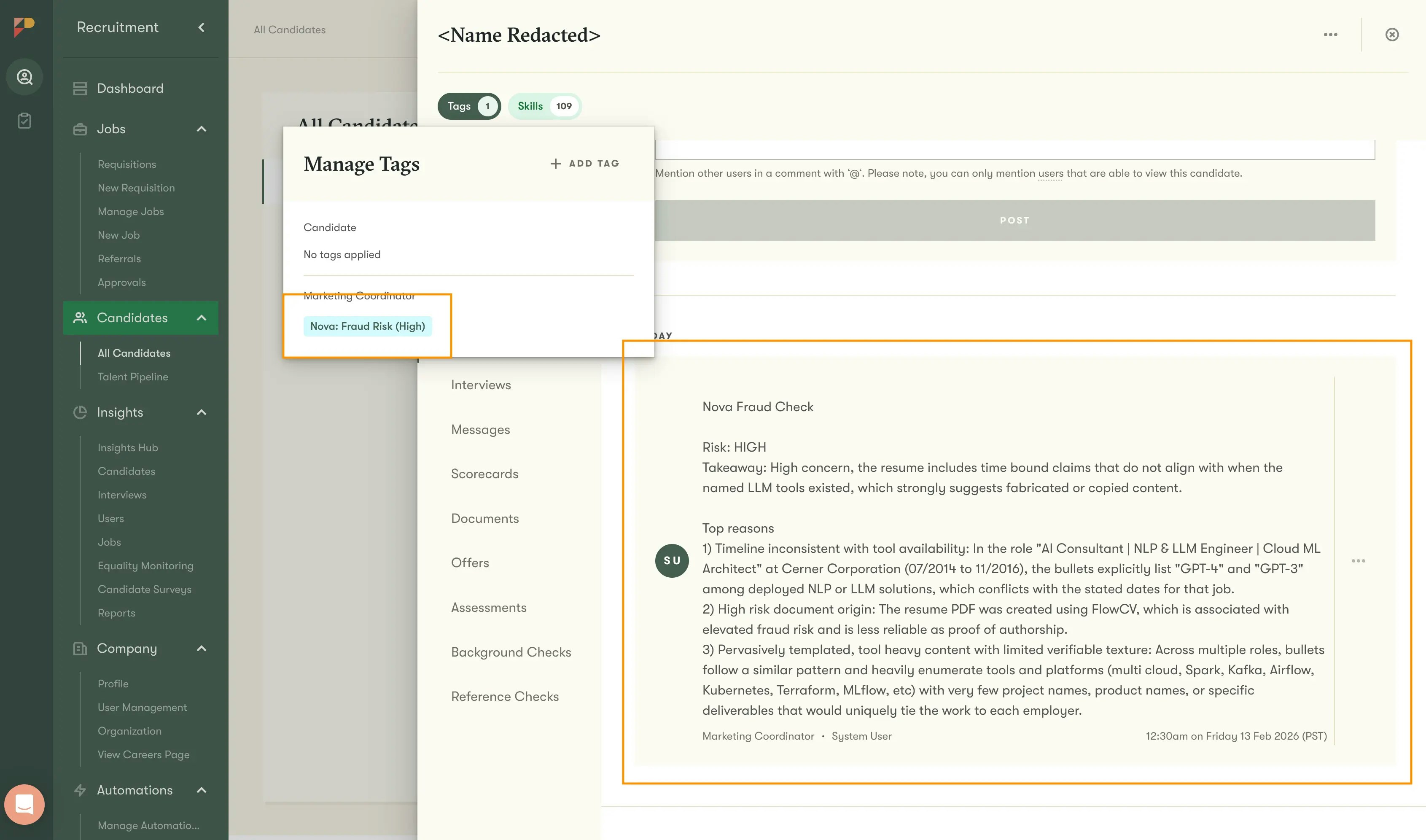
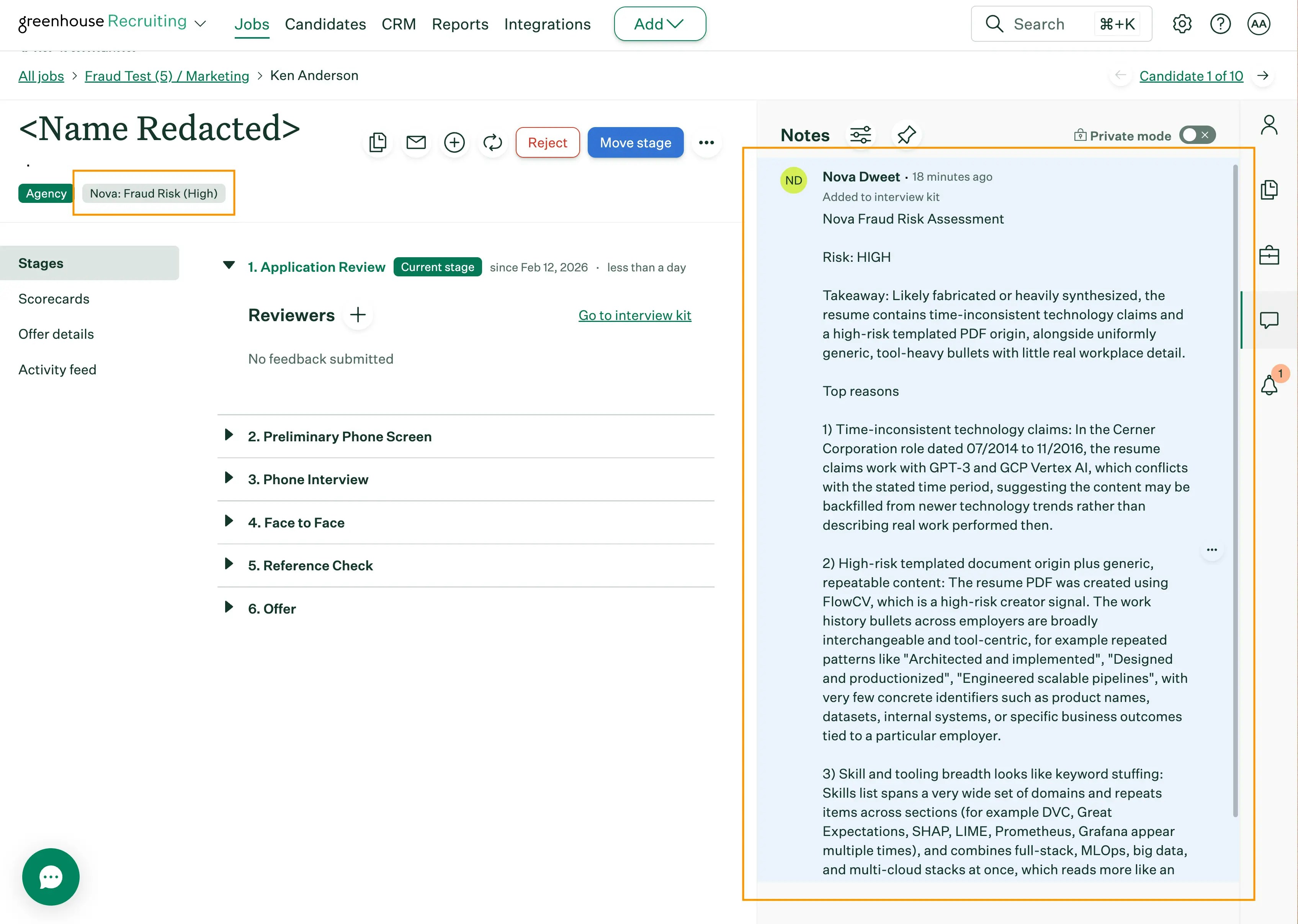
Nova’s fraud detection automatically analyzes your top candidates for signs of resume fraud. Each assessment is posted directly into your ATS as a note and tag, and also appears on the Fraud Detection dashboard in Nova where you can review trends, filter by risk level, and see the full analysis for each candidate. It runs after scoring, only on candidates above your configured threshold, so you get fraud screening exactly where it matters: on the candidates your recruiters will review.
Fraud detection is available as part of Nova’s scoring pipeline. Contact your account manager to enable it for your organization.

How It Works

1

Nova scores the candidate

When a new application comes in, Nova scores it against your configured criteria as usual.
2

High-scoring candidates are analyzed for fraud

If the candidate scores at or above your fraud detection threshold (default: 7/10), Nova runs a separate fraud analysis. This analysis combines resume text analysis with multiple independent external validation signals.
3

Results are posted to your ATS

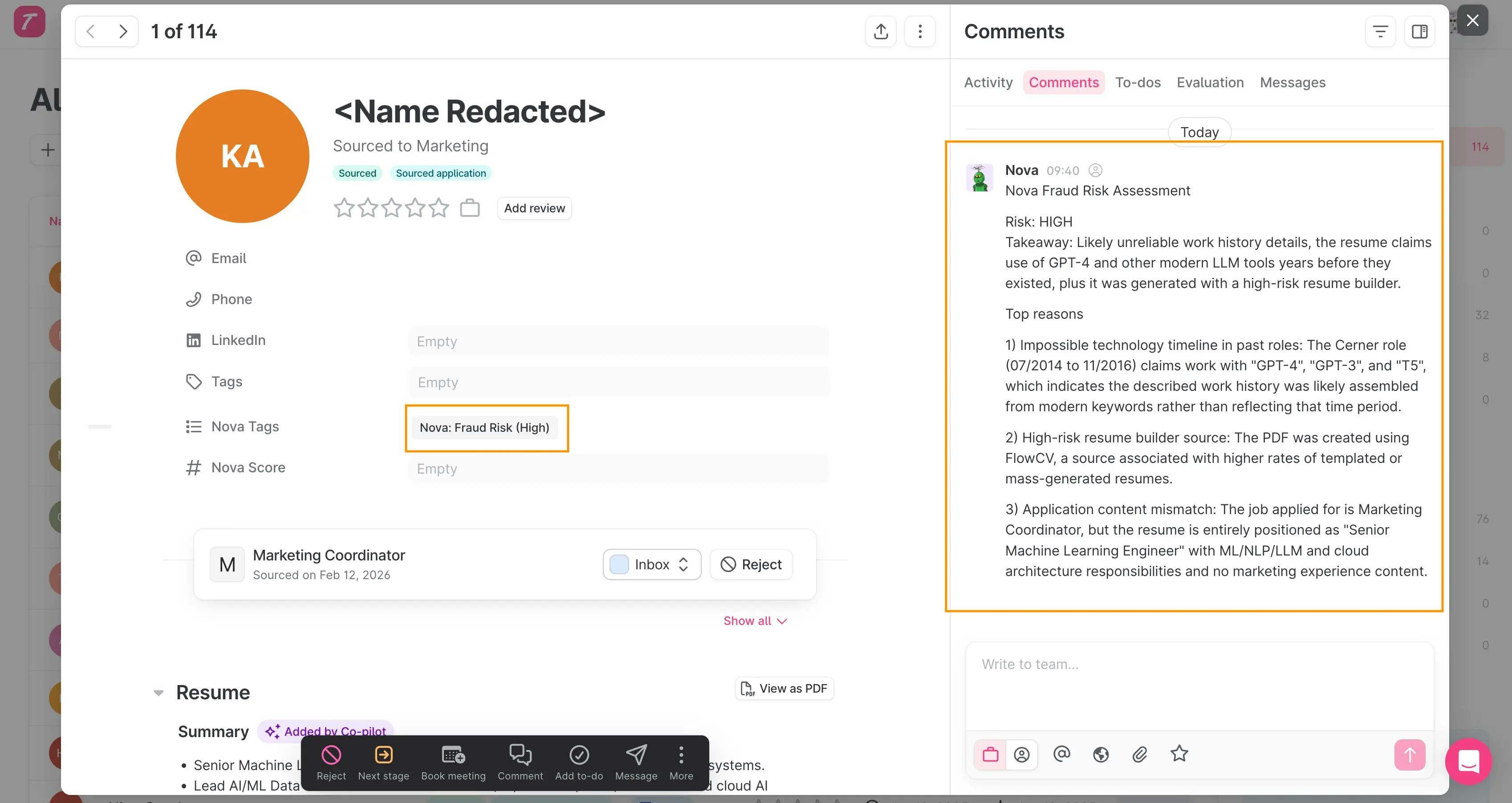
A structured fraud risk assessment is added as a note on the candidate’s application. Candidates flagged as medium or high risk are tagged with their specific risk level (e.g. “Nova: Fraud Risk (High)”), so you can filter and review them quickly.

What Nova Analyzes

Nova evaluates resumes across multiple independent dimensions. When concerns from different dimensions converge, the fraud probability increases. When only surface-level issues are present, risk stays low.
DimensionWhat it checks
Timeline integrityOverlapping dates, impossible sequences, future-dated roles
Career progressionSeniority jumps that skip expected intermediate levels
Skill credibilityImplausibly broad technology lists spanning unrelated domains, keyword stuffing
Quantitative claimsRepeated large impact numbers without baselines or context
Document metadataSuspicious PDF creation tools and document assembly artifacts
Hidden content detectionInvisible text via tiny font sizes, keyword stuffing, overlapping duplicate text layers
Email verificationEmail deliverability, account age, and breach history. Contact data is sourced from ATS structured fields first, falling back to resume text extraction.
LinkedIn validationProfile completeness, activity history, identity coherence, and timeline consistency. When available, Nova can reason over structured LinkedIn profile context in addition to summary signals.
Cross-candidate detectionThe same email, phone number, or LinkedIn profile appearing across multiple different applications within your company. Reapplications from the same candidate are excluded.
AI generation patternsResumes that read like uniform templates with zero authentic workplace detail
Nova distinguishes between normal resume polish (which is standard career advice) and pervasive patterns that suggest fabrication. A few metrics-driven bullet points are not suspicious. An entire resume that reads like a template with no project names, team names, or specific workplace detail is a different story.

Reading the Risk Assessment

Each fraud analysis produces a short note in your ATS designed for fast review:
  • Risk: Low, Medium, or High
  • Takeaway: One-line summary of the main concern or all-clear
  • Top reasons (up to 3): Key evidence from the resume or automated checks
  • Reason wording: Direct factual statements in plain English, not internal process language
  • Reassuring signs (optional): Brief indicators that reduce concern when risk is low

Risk levels explained

Risk levelWhat it meansRecommended action
LowNo meaningful concerns foundProceed normally
MediumSome structural concerns or signal convergenceReview the top reasons and verify claims during screening
HighStrong evidence of fabrication from multiple independent sourcesPrioritize verification before advancing
Fraud detection results are a screening aid, not a final judgment. Always verify concerns through interviews or document checks before making hiring decisions.

How it looks in your ATS

Fraud detection note displayed on a candidate profile in Ashby

Benchmark and Accuracy

We maintain an internal benchmark of hundreds of real resumes sourced from production hiring pipelines, including confirmed fraudulent applications and verified legitimate ones. Every change to the fraud detection system is validated against this benchmark before reaching production.
MetricValueWhat it means
PrecisionOver 93%When Nova flags a resume, it is correct over 93% of the time
False alarm rateUnder 4%Fewer than 1 in 25 legitimate resumes are incorrectly flagged
High-confidence precision100%At the highest confidence level, Nova has zero false positives across the full benchmark
The benchmark includes a deliberately challenging set of legitimate resumes: polished AI-assisted writing, career changers, international candidates, and corporate email addresses. This ensures the system performs well on real-world edge cases, not just easy examples.

Why only high-scoring candidates are checked

Nova only runs fraud analysis on candidates who score at or above your configured threshold (default: 7/10). There are two reasons for this:
  1. These are the candidates your recruiters will actually review. A candidate who scores 3/10 is unlikely to progress regardless of whether their resume is genuine. Fraud detection adds the most value on candidates who would otherwise move forward in your pipeline.
  2. Fraudulent resumes tend to score high. AI-generated and fabricated resumes are often designed to match job requirements closely, which means they score well against your criteria. The candidates most likely to be fraudulent are concentrated in the high-scoring group.
This approach keeps costs proportional to value: you pay for fraud analysis only on the candidates where the result changes what you do next.
If you want broader coverage, you can lower the threshold in your settings. Setting it to 0 checks every candidate, though this increases cost without typically changing outcomes for low-scoring applications.

Configuring Fraud Detection

Open the Fraud Detection page in your Nova dashboard and click the settings icon (gear) in the top right corner.

Settings

SettingDescriptionDefault
Enable fraud detectionToggle fraud analysis on or offDisabled
Score thresholdMinimum Nova score (0-10) required to trigger fraud analysis7

Fraud Detection Dashboard

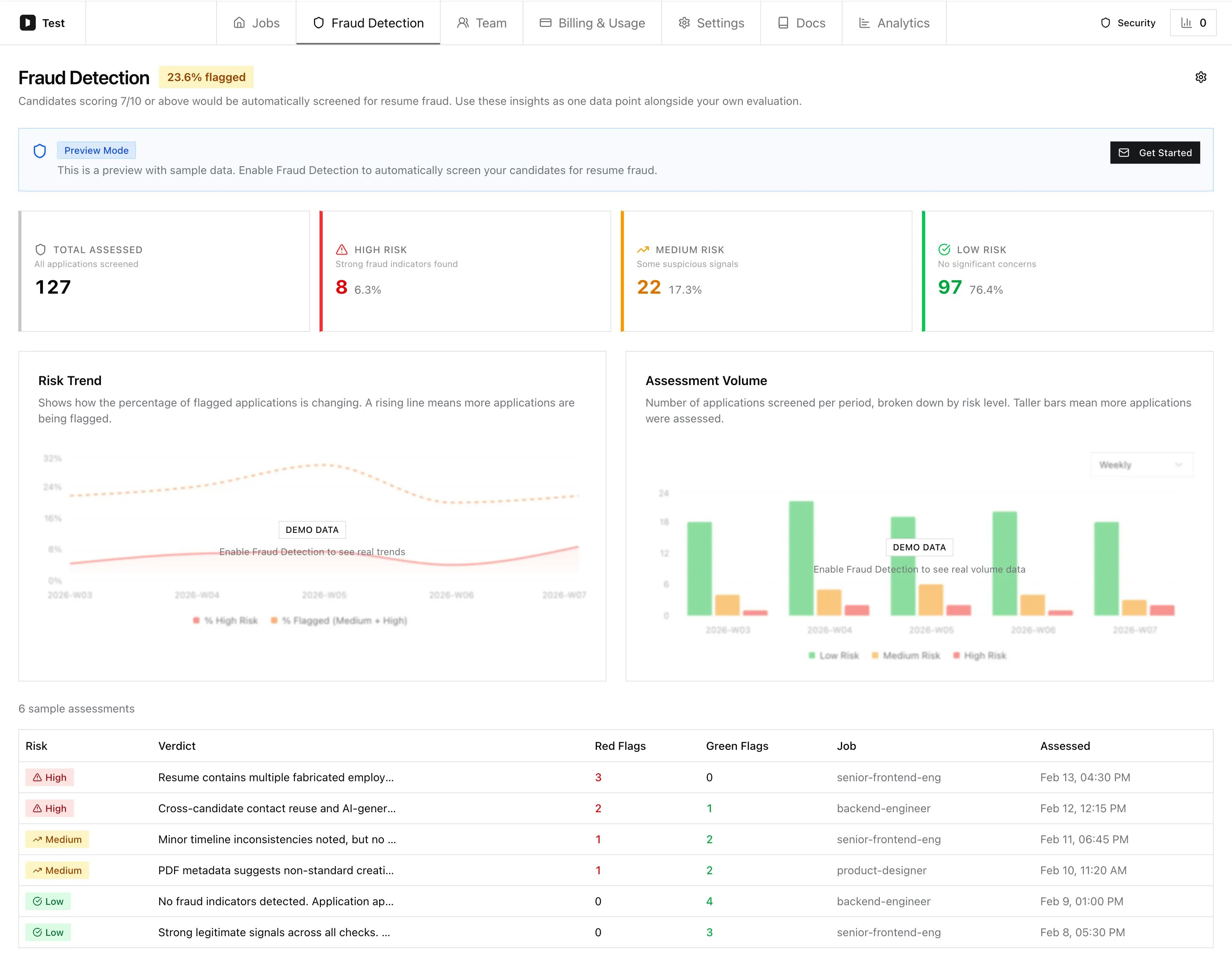
When fraud detection is enabled, you get a dedicated dashboard showing all screened applications with their risk levels.

What you will see

SectionWhat it shows
Flagged rate badgePercentage of screened applications rated medium or high risk
Summary cardsTotal assessed, plus counts for high, medium, and low risk. Click a card to filter the table to that risk level.
Risk trend chartHow the percentage of flagged applications is changing over time. A rising line means more applications are being flagged.
Assessment volume chartNumber of applications screened per period, broken down by risk level
Assessment tableFull list of screened applications with risk level, verdict, and fraud probability. Click any row to see the detailed analysis.
You can filter by date range and risk level, and switch the chart granularity between daily, weekly, and monthly views.
Fraud Detection dashboard with risk breakdown, trend chart, assessment volume, and sample assessments table

Risk assessment detail

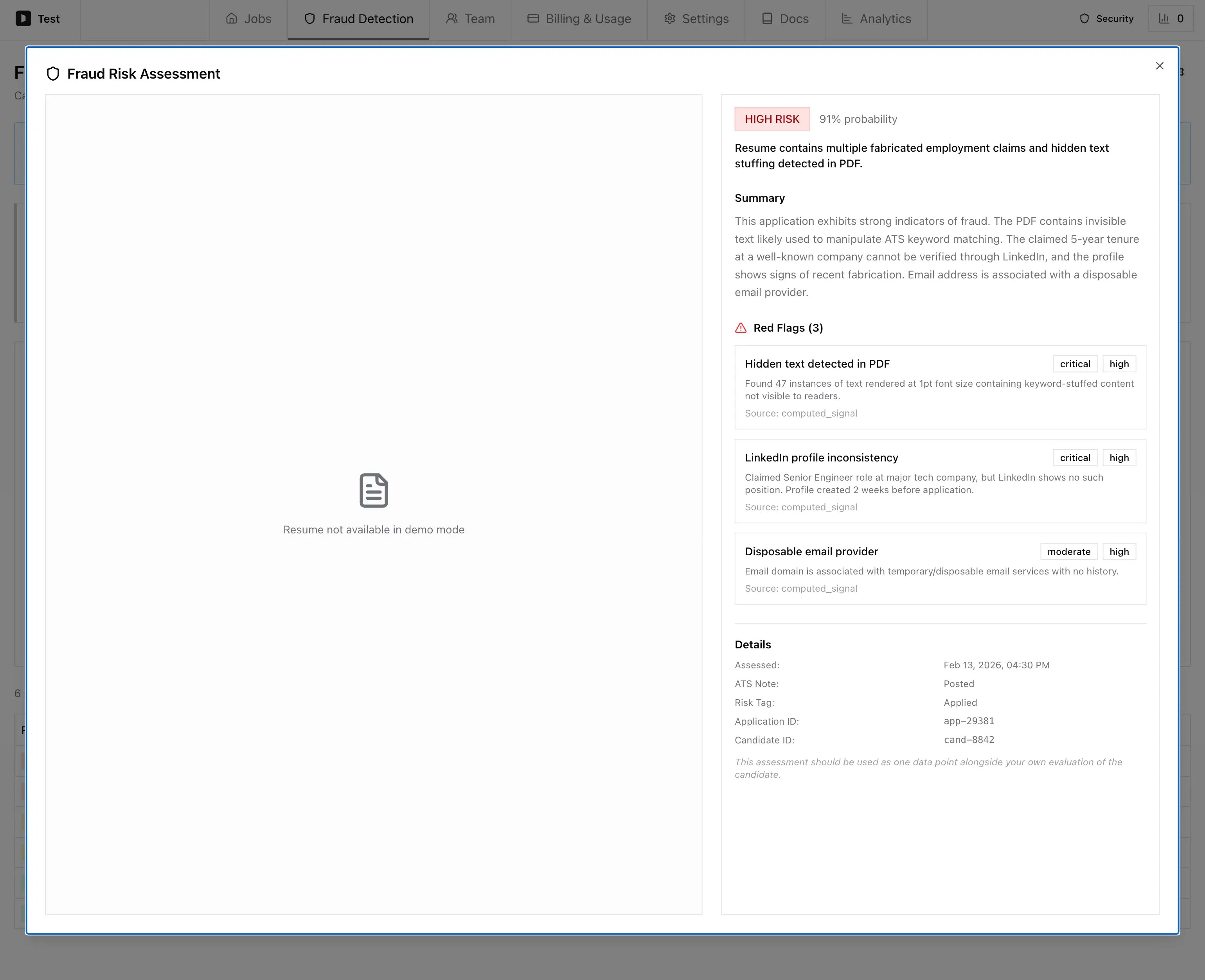
Clicking a candidate row opens the full risk assessment, showing the risk level, probability, summary, red flags with severity and evidence, and metadata such as assessment date and ATS note status.
Fraud Risk Assessment dialog showing high risk verdict, summary, three red flags with severity badges, and assessment details

Frequently Asked Questions

Fraud detection is designed to fail gracefully. If the analysis encounters an error, the candidate’s score and ATS note are unaffected. The scoring result is always delivered regardless of whether fraud detection succeeds.
Use the top reasons in the risk assessment as your interview checklist. Most concerns can be resolved by asking the candidate to walk through specific claims on their resume. A medium risk flag means “verify before deciding,” not “reject the candidate.”
Some corporate mail servers return “undeliverable” for external verification attempts as a security measure. Nova accounts for this in its scoring, but if you see email-related flags for candidates using corporate addresses, this is likely the cause. Review the other signals in the assessment.