> ## Documentation Index
> Fetch the complete documentation index at: https://nova.dweet.com/docs/llms.txt
> Use this file to discover all available pages before exploring further.

# Teamtailor Integration

> How to connect Nova with Teamtailor and where scores appear.

<Card title="Start your free trial" icon="calendar" href="https://nova.dweet.com?book-call=true&utm_source=docs&utm_medium=cta&utm_campaign=integration&utm_content=teamtailor">
  Book a call to get your Nova account set up.
</Card>

## How Nova Works in Teamtailor

<div style={{ position: 'relative', paddingBottom: 'calc(68.47896440129449% + 41px)', height: '0', width: '100%' }}>
  <iframe src="https://demo.arcade.software/iRHhO8ace0DPjd3vPqYI?embed&embed_mobile=tab&embed_desktop=inline&show_copy_link=true" title="How Nova Works in Teamtailor" frameBorder="0" loading="lazy" allowFullScreen allow="clipboard-write" style={{ position: 'absolute', top: 0, left: 0, width: '100%', height: '100%', colorScheme: 'light' }} />
</div>

## Setting Up the Integration

<iframe className="w-full aspect-video rounded-xl" src="https://www.loom.com/embed/8296577d72de4b6485de008c5b670f87" title="Teamtailor Integration Steps" frameBorder="0" allowFullScreen />

### ATS User Settings

By default, Nova uses your first admin user. For clearer attribution, create a dedicated "Nova" user in Teamtailor and select it via ATS Settings on your Jobs page.

[Complete ATS User Settings Guide](/nova/account/ats-user-settings)

## How Scores Appear in Teamtailor

<iframe className="w-full aspect-video rounded-xl" src="https://www.loom.com/embed/c0735120d7014d9eb8389bcd8e6ce93a" title="How Nova Scores Appear in Teamtailor" frameBorder="0" allowFullScreen />

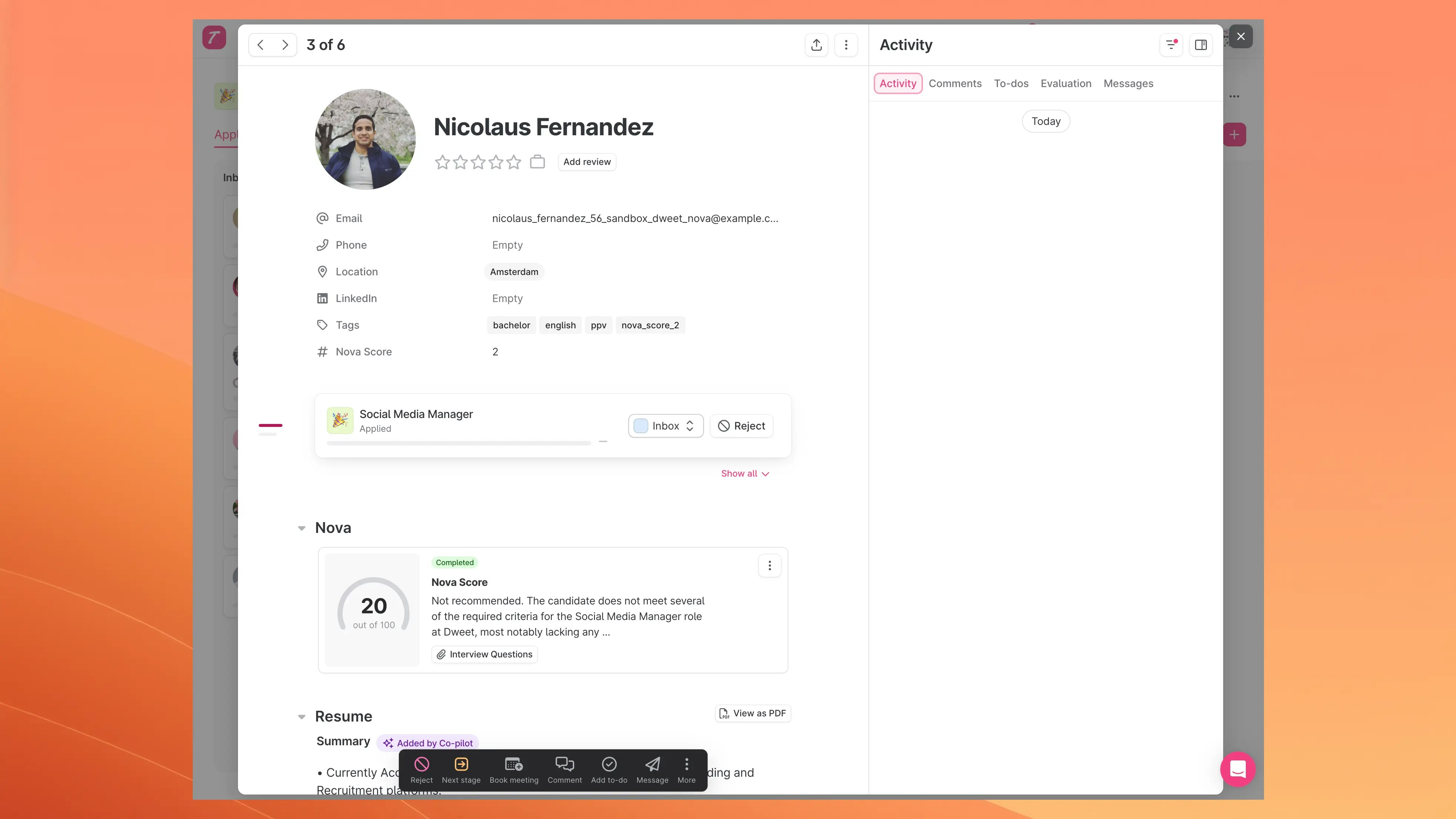
Scores appear as a **partner result** on the candidate's profile with a summary view and detailed analysis.

### Candidate Card Display

<Frame>
  <img src="https://mintcdn.com/nova-aee55099/OouzTwo9AH8zfe7F/images/docs/teamtailor-nova-score.webp?fit=max&auto=format&n=OouzTwo9AH8zfe7F&q=85&s=3b4129a012926526a874d421dfcc672a" alt="Nova score on a Teamtailor candidate card" width="3928" height="2210" data-path="images/docs/teamtailor-nova-score.webp" />
</Frame>

The card shows:

* **Nova Score**: overall score out of 100
* **Status**: completion status
* **Summary**: brief assessment
* **Interview Questions**: Nova-generated questions (see [Nova AI Screening](/nova/features/interview-questions))
<Note>
  Interview questions require a separate feature flag. Contact **[nova@dweet.com](mailto:nova@dweet.com)** to enable.
</Note>

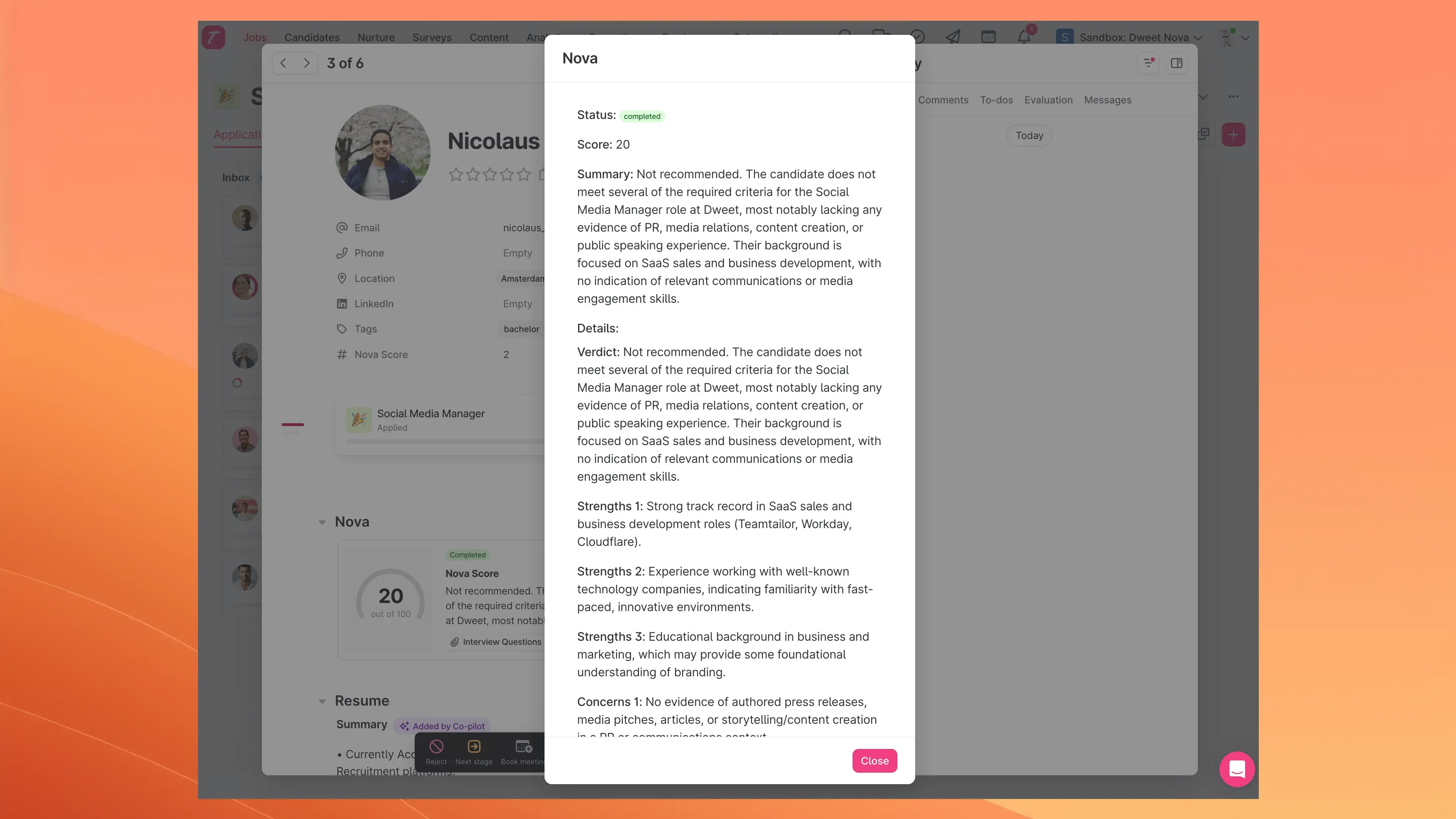
### Detailed Scoring View

Click the Nova result to open the full analysis:

<Frame>
  <img src="https://mintcdn.com/nova-aee55099/OouzTwo9AH8zfe7F/images/docs/teamtailor-score-modal.webp?fit=max&auto=format&n=OouzTwo9AH8zfe7F&q=85&s=5968e676f3078fc75453efacc7d66e71" alt="Nova detailed scoring modal in Teamtailor" width="3928" height="2210" data-path="images/docs/teamtailor-score-modal.webp" />
</Frame>

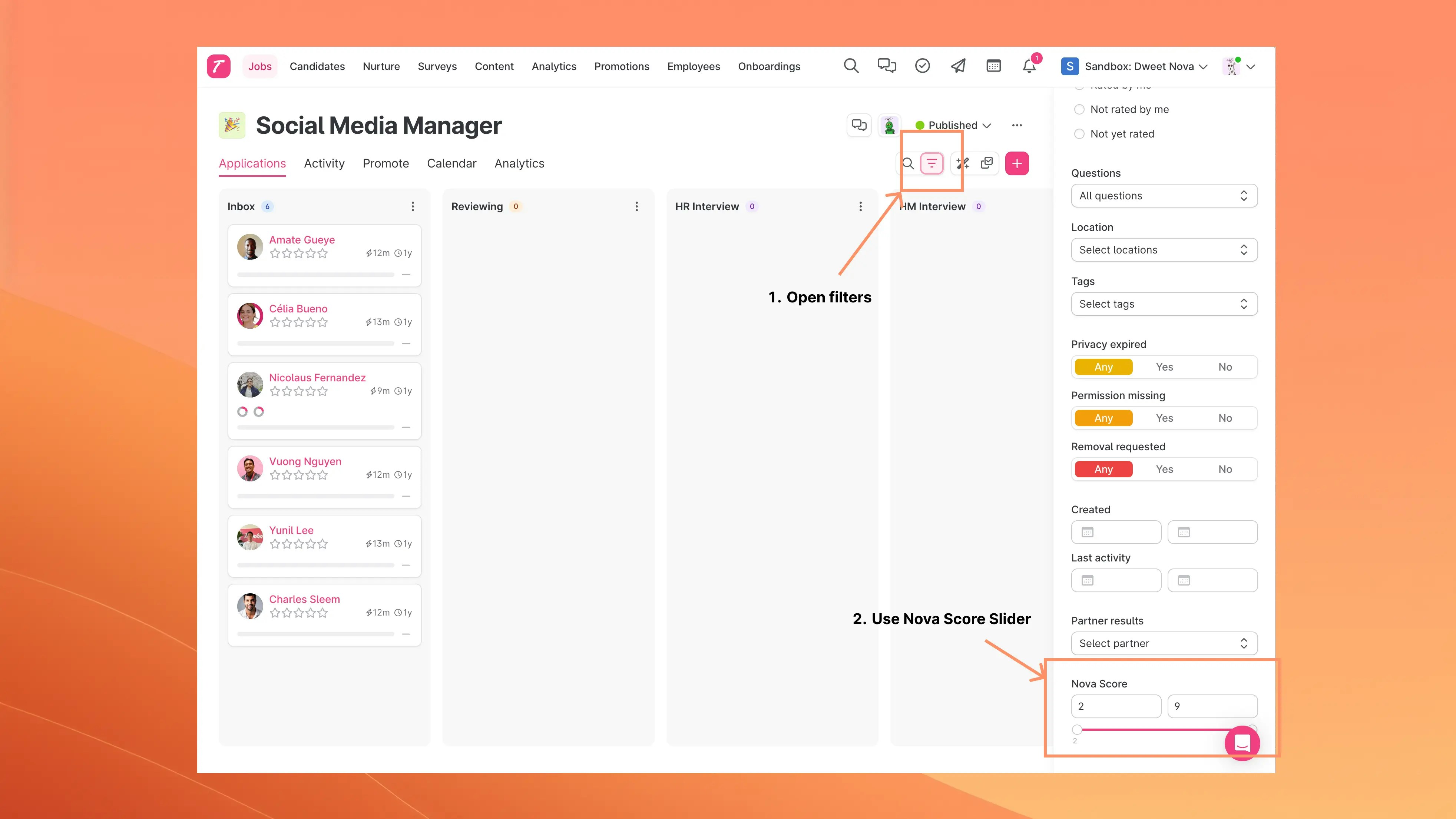
## Filtering Candidates by Nova Score

Use the **Nova Score** filter in your candidate list to set a score range threshold.
<Frame>
  <img src="https://mintcdn.com/nova-aee55099/OouzTwo9AH8zfe7F/images/docs/teamtailor-nova-score-filtering.webp?fit=max&auto=format&n=OouzTwo9AH8zfe7F&q=85&s=82dbe70eb1e115a207698a696710a816" alt="Nova score filter in Teamtailor" width="3928" height="2210" data-path="images/docs/teamtailor-nova-score-filtering.webp" />
</Frame>

<iframe className="w-full aspect-video rounded-xl" src="https://www.loom.com/embed/c0735120d7014d9eb8389bcd8e6ce93a" title="How Nova Scores Appear in Teamtailor" frameBorder="0" allowFullScreen />

## LinkedIn Profile Support

For candidates without a CV but with a LinkedIn URL, Nova can retrieve and score their LinkedIn profile data.

* **Disabled by default.** Contact **[nova@dweet.com](mailto:nova@dweet.com)** to enable
* Applies to all candidates with LinkedIn URLs but no uploaded resume

## Automatic Candidate Filtering

Nova skips scoring for rejected candidates.
