> ## Documentation Index
> Fetch the complete documentation index at: https://nova.dweet.com/docs/llms.txt
> Use this file to discover all available pages before exploring further.
# Fraud Detection
> Automatically screen high-scoring candidates for resume fraud with multi-layered AI analysis validated against a real-world benchmark.
Nova automatically analyzes top candidates for resume fraud. Results post to your ATS as a note and tag, and appear on the Fraud Detection dashboard. It only runs on candidates at or above your configured score threshold, so fraud screening targets the candidates your recruiters will actually review.
Contact your account manager to enable fraud detection.
## How It Works
Normal scoring against your criteria.
Candidates at or above your threshold (default: 7/10) get a separate fraud analysis combining text analysis with external validation signals.
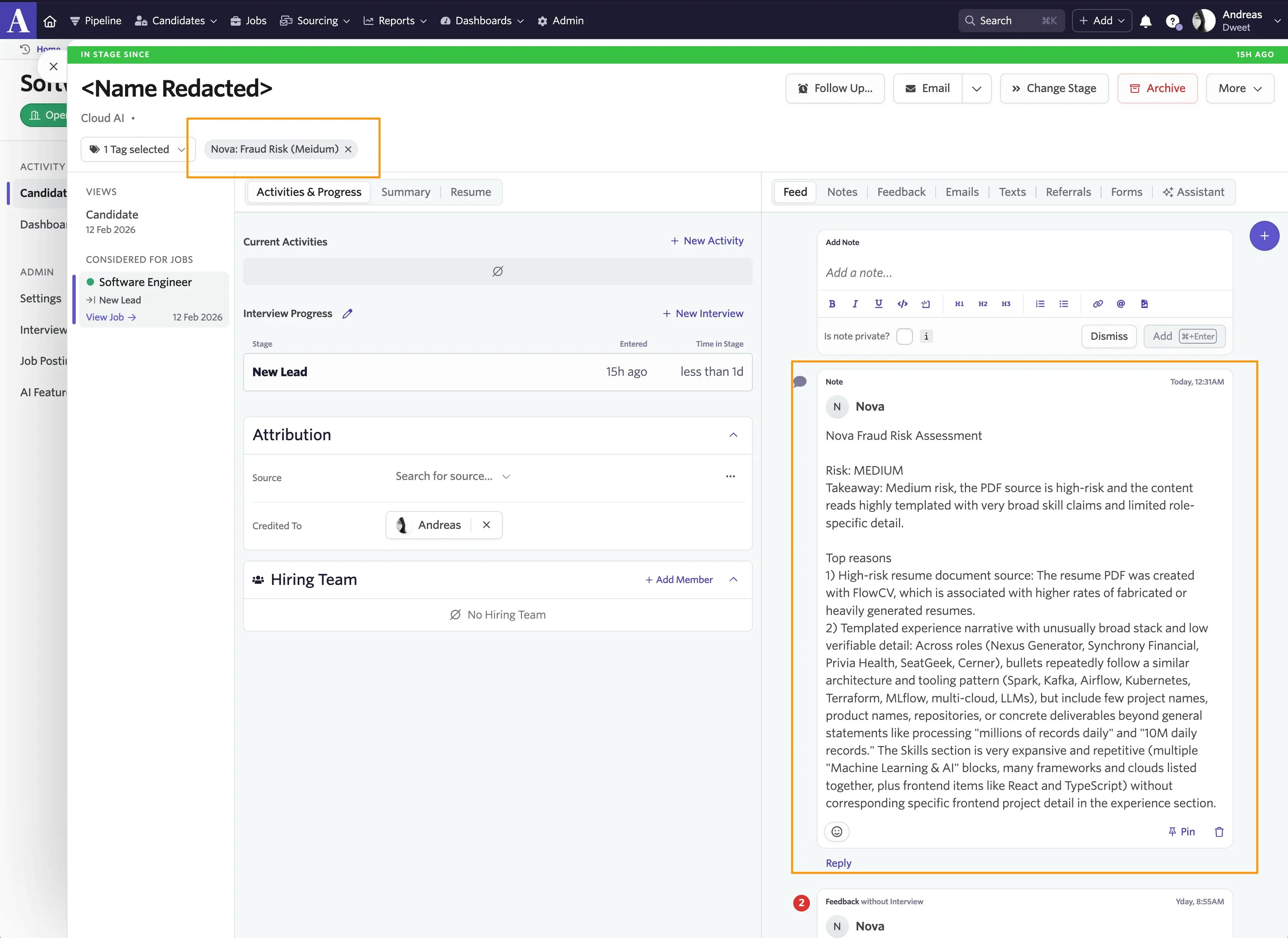
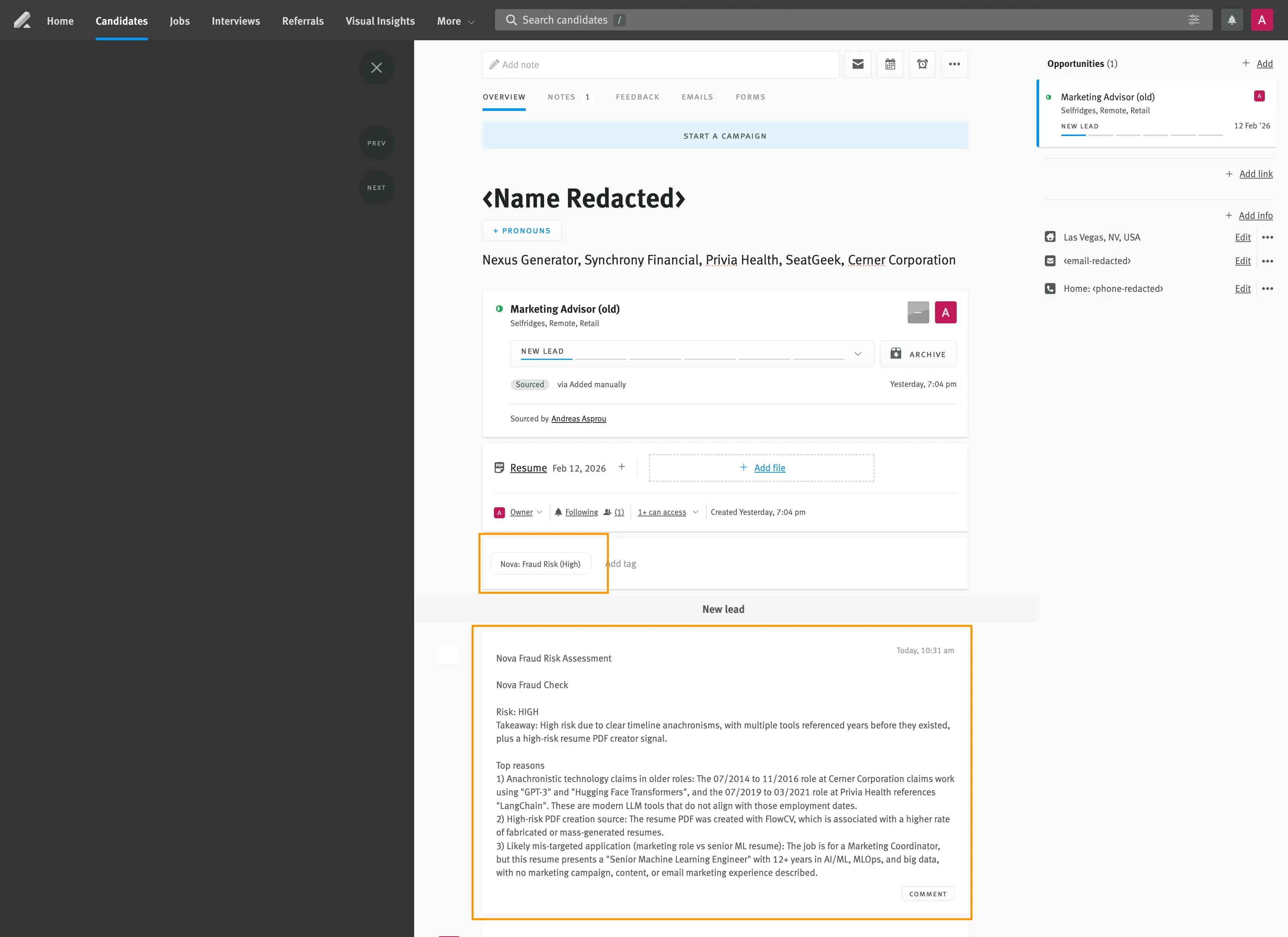
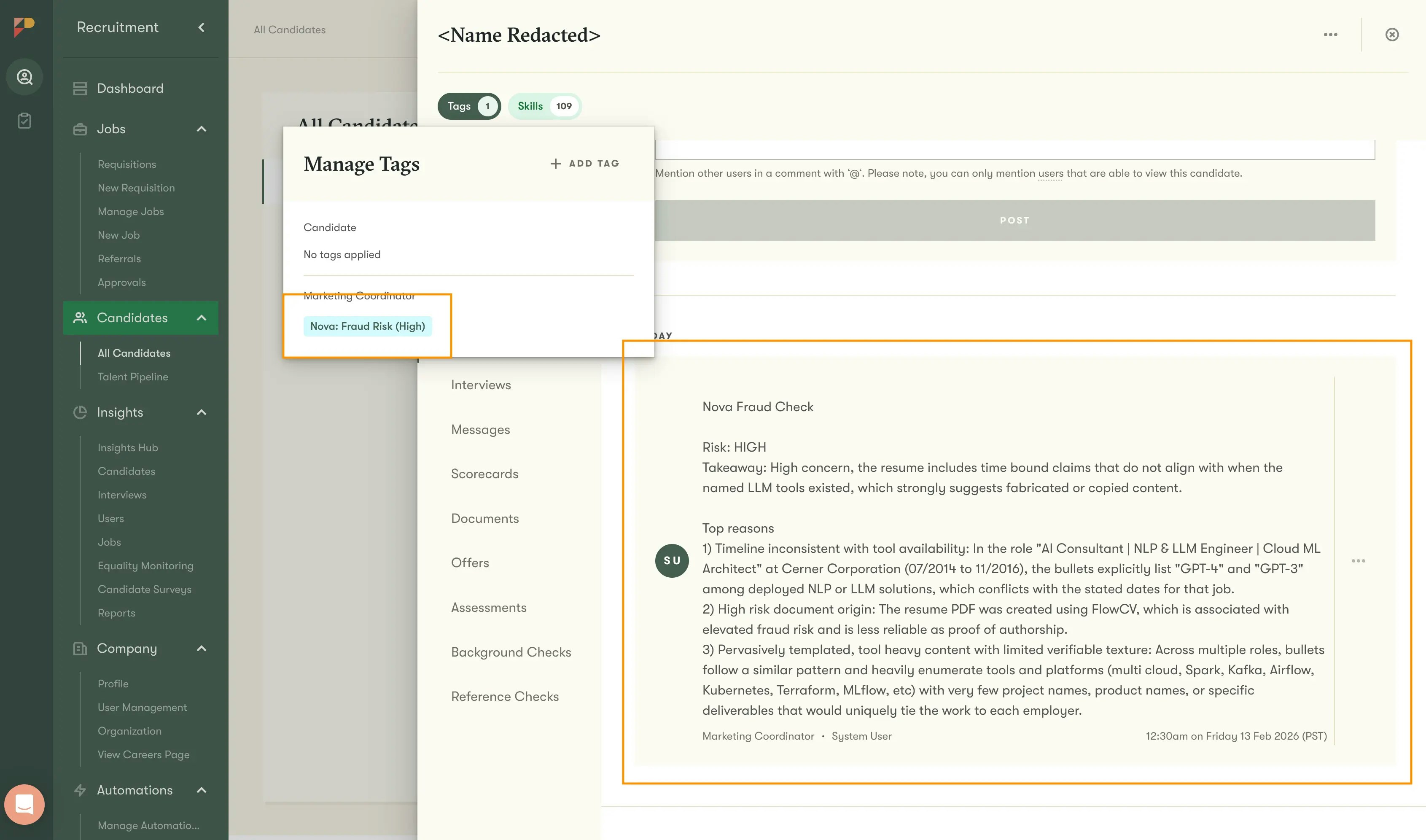
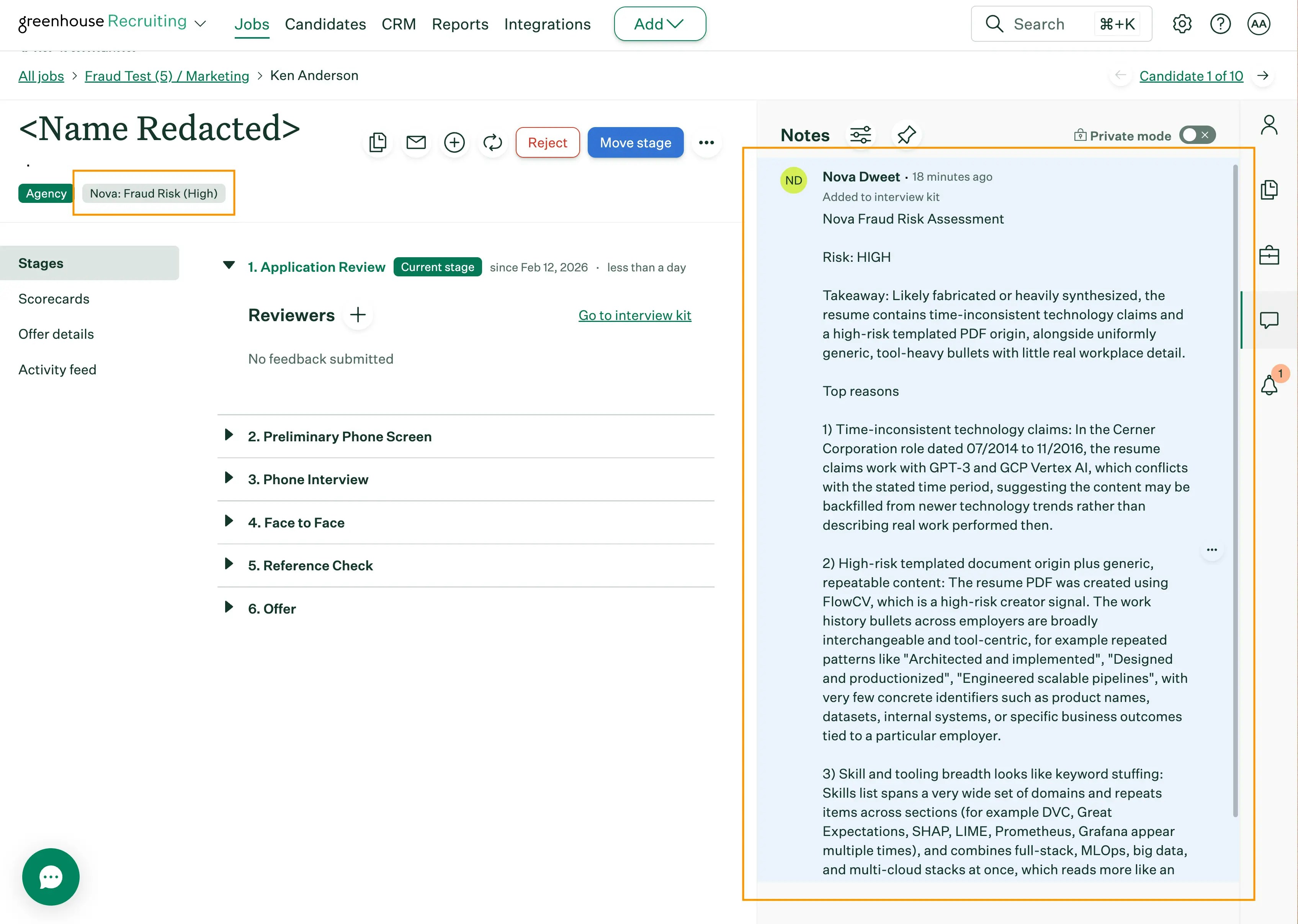
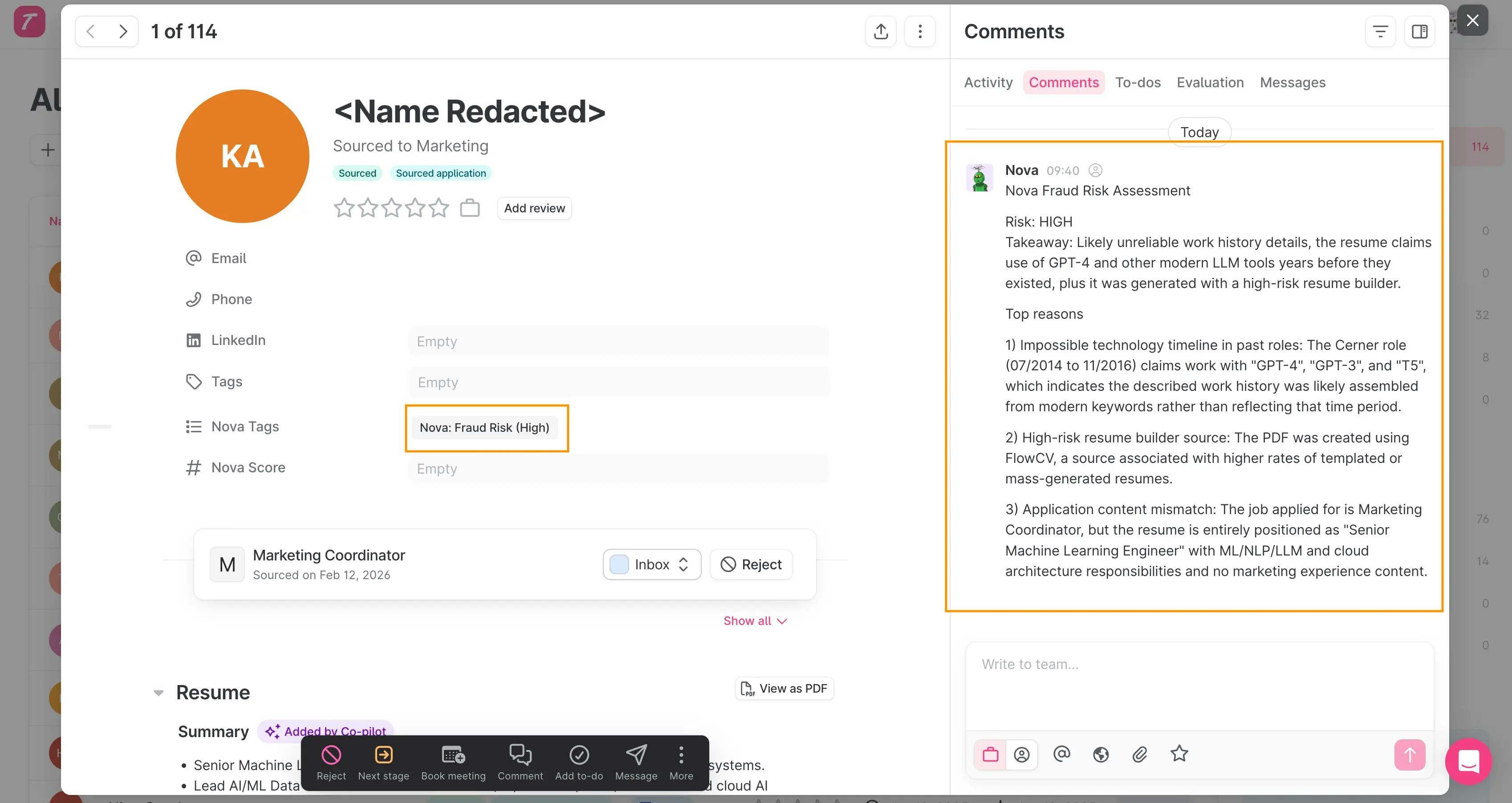
A fraud risk assessment posts as a note. Medium or high risk candidates get tagged (e.g. "Nova: Fraud Risk (High)") for quick filtering.
## What Nova Analyzes
When concerns from different dimensions converge, fraud probability increases. Surface-level issues alone keep risk low.
| Dimension | What it checks |
| ----------------------------- | ------------------------------------------------------------------------------------- |
| **Timeline integrity** | Overlapping dates, impossible sequences, future-dated roles |
| **Career progression** | Seniority jumps that skip expected intermediate levels |
| **Skill credibility** | Implausibly broad tech lists, keyword stuffing |
| **Quantitative claims** | Repeated large impact numbers without baselines |
| **Document metadata** | Suspicious PDF creation tools, assembly artifacts |
| **Hidden content** | Invisible text via tiny fonts, overlapping duplicate layers |
| **Email verification** | Deliverability, account age, breach history |
| **LinkedIn validation** | Profile completeness, activity, identity coherence, timeline consistency |
| **Cross-candidate detection** | Same email, phone, or LinkedIn across multiple applications (excludes reapplications) |
| **AI generation patterns** | Uniform templates with zero authentic workplace detail |
Nova distinguishes between normal resume polish and pervasive patterns suggesting fabrication. A few metrics-driven bullet points aren't suspicious. An entire resume with no project names, team names, or workplace specifics is a different story.
## Reading the Risk Assessment
Each analysis produces a short ATS note:
* **Risk**: Low, Medium, or High
* **Takeaway**: One-line summary
* **Top reasons** (up to 3): Key evidence
* **Reassuring signs** (optional): Indicators that reduce concern
### Risk levels
| Risk level | What it means | Recommended action |
| ---------- | ---------------------------------------------------- | ---------------------------------------- |
| **Low** | No meaningful concerns | Proceed normally |
| **Medium** | Structural concerns or signal convergence | Verify claims during screening |
| **High** | Strong evidence of fabrication from multiple sources | Prioritize verification before advancing |
Fraud results are a screening aid, not a final judgment. Always verify through interviews or document checks.
### How it looks in your ATS
 ## Benchmark and Accuracy
We validate every change against an internal benchmark of hundreds of real resumes from production pipelines, including confirmed fraud and verified legitimate applications.
| Metric | Value |
| ----------------------------- | ------------------------------------------------- |
| **Precision** | Over 93% |
| **False alarm rate** | Under 4% |
| **High-confidence precision** | 100% (zero false positives at highest confidence) |
The benchmark includes deliberately challenging legitimate resumes: AI-assisted writing, career changers, international candidates, corporate emails.
## Why only high scorers are checked
1. **These are the candidates your recruiters will review.** A 3/10 isn't progressing regardless.
2. **Fraudulent resumes tend to score high.** They're designed to match job requirements closely.
Lower the threshold in settings for broader coverage. Setting it to 0 checks everyone, though this increases cost without typically changing outcomes for low scorers.
## Configuring Fraud Detection
Open **Fraud Detection** in your Nova dashboard and click the settings icon.
| Setting | Default |
| -------------------------- | -------- |
| **Enable fraud detection** | Disabled |
| **Score threshold** | 7 |
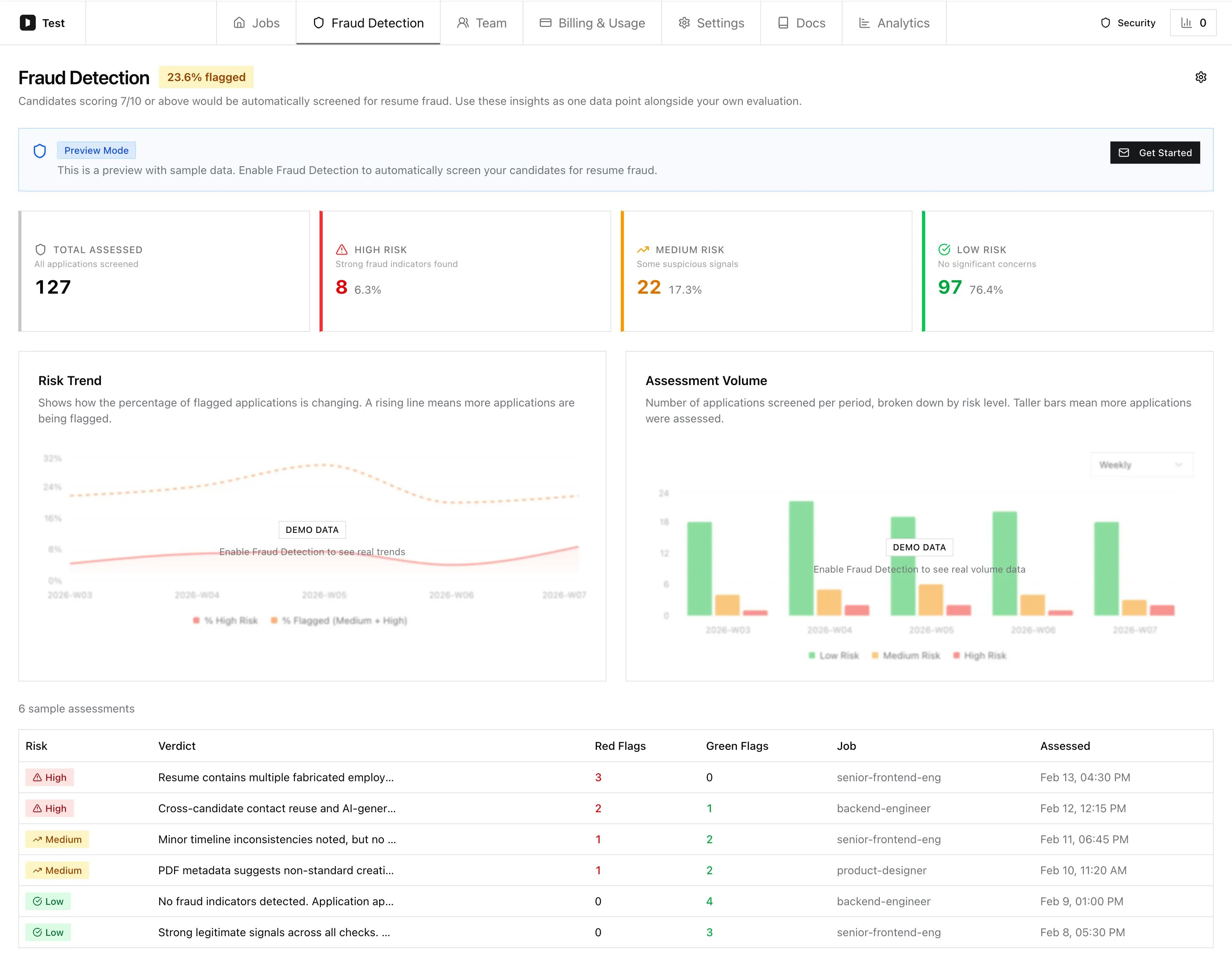
## Dashboard
| Section | What it shows |
| --------------------------- | ------------------------------------------------------------------------------------- |
| **Flagged rate badge** | Percentage of screened applications rated medium or high risk |
| **Summary cards** | Total assessed, plus high/medium/low counts. Click to filter. |
| **Risk trend chart** | Flagged percentage over time |
| **Assessment volume chart** | Applications screened per period by risk level |
| **Assessment table** | Full list with risk level, verdict, and fraud probability. Click any row for details. |
Filter by date range and risk level. Switch granularity between daily, weekly, and monthly.
## Benchmark and Accuracy
We validate every change against an internal benchmark of hundreds of real resumes from production pipelines, including confirmed fraud and verified legitimate applications.
| Metric | Value |
| ----------------------------- | ------------------------------------------------- |
| **Precision** | Over 93% |
| **False alarm rate** | Under 4% |
| **High-confidence precision** | 100% (zero false positives at highest confidence) |
The benchmark includes deliberately challenging legitimate resumes: AI-assisted writing, career changers, international candidates, corporate emails.
## Why only high scorers are checked
1. **These are the candidates your recruiters will review.** A 3/10 isn't progressing regardless.
2. **Fraudulent resumes tend to score high.** They're designed to match job requirements closely.
Lower the threshold in settings for broader coverage. Setting it to 0 checks everyone, though this increases cost without typically changing outcomes for low scorers.
## Configuring Fraud Detection
Open **Fraud Detection** in your Nova dashboard and click the settings icon.
| Setting | Default |
| -------------------------- | -------- |
| **Enable fraud detection** | Disabled |
| **Score threshold** | 7 |
## Dashboard
| Section | What it shows |
| --------------------------- | ------------------------------------------------------------------------------------- |
| **Flagged rate badge** | Percentage of screened applications rated medium or high risk |
| **Summary cards** | Total assessed, plus high/medium/low counts. Click to filter. |
| **Risk trend chart** | Flagged percentage over time |
| **Assessment volume chart** | Applications screened per period by risk level |
| **Assessment table** | Full list with risk level, verdict, and fraud probability. Click any row for details. |
Filter by date range and risk level. Switch granularity between daily, weekly, and monthly.
 ### Risk assessment detail
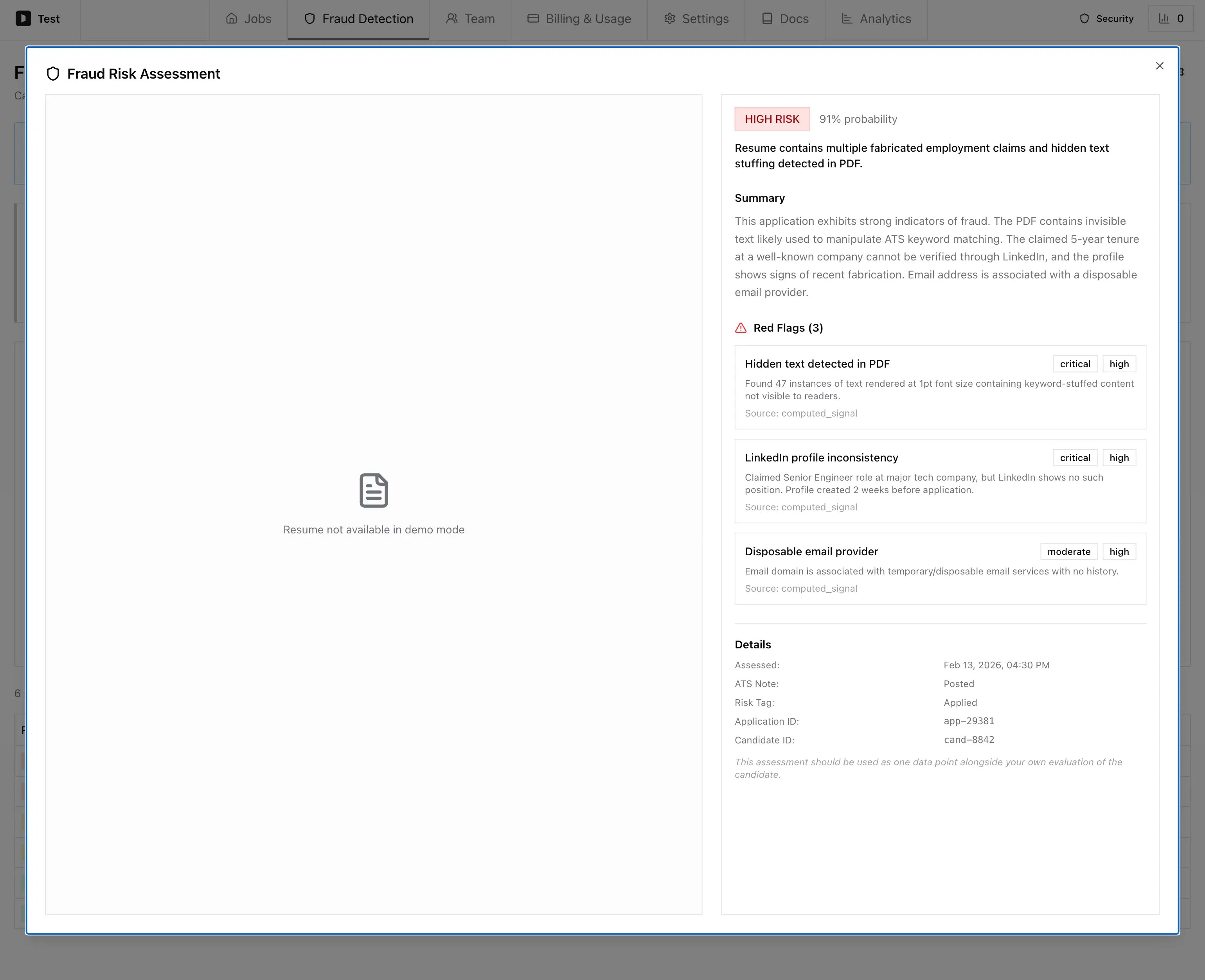
Click a candidate row to see the full assessment: risk level, probability, summary, red flags with severity and evidence, and metadata.
### Risk assessment detail
Click a candidate row to see the full assessment: risk level, probability, summary, red flags with severity and evidence, and metadata.
 It fails gracefully. The candidate's score and ATS note aren't affected. Scoring always delivers regardless of fraud detection status.
Use the top reasons as your interview checklist. Most concerns resolve by asking the candidate to walk through specific resume claims.
Some corporate mail servers return "undeliverable" for external verification as a security measure. Nova accounts for this, but if you see email flags for corporate addresses, review the other signals.
It fails gracefully. The candidate's score and ATS note aren't affected. Scoring always delivers regardless of fraud detection status.
Use the top reasons as your interview checklist. Most concerns resolve by asking the candidate to walk through specific resume claims.
Some corporate mail servers return "undeliverable" for external verification as a security measure. Nova accounts for this, but if you see email flags for corporate addresses, review the other signals.