> ## Documentation Index
> Fetch the complete documentation index at: https://nova.dweet.com/docs/llms.txt
> Use this file to discover all available pages before exploring further.
# Changelog
> Latest updates and improvements to Nova
### AI Outbound Talent Search: A working queue for adding people to LinkedIn
Adding a shortlist to LinkedIn Recruiter is a queue, and now it works like one. Once you send people to a project, they collapse into an **"Exported to \"** group and drop out of your working list, so what stays in front of you is only who you have left to add. Your shortlist count does not change, because they are still shortlisted.
You can now order that list by **most recently found** or **most recently shortlisted**, not just by fit, so the newest people are easy to pick out instead of lost in a fixed order.
### AI Outbound Talent Search: Benchmark profiles on every search
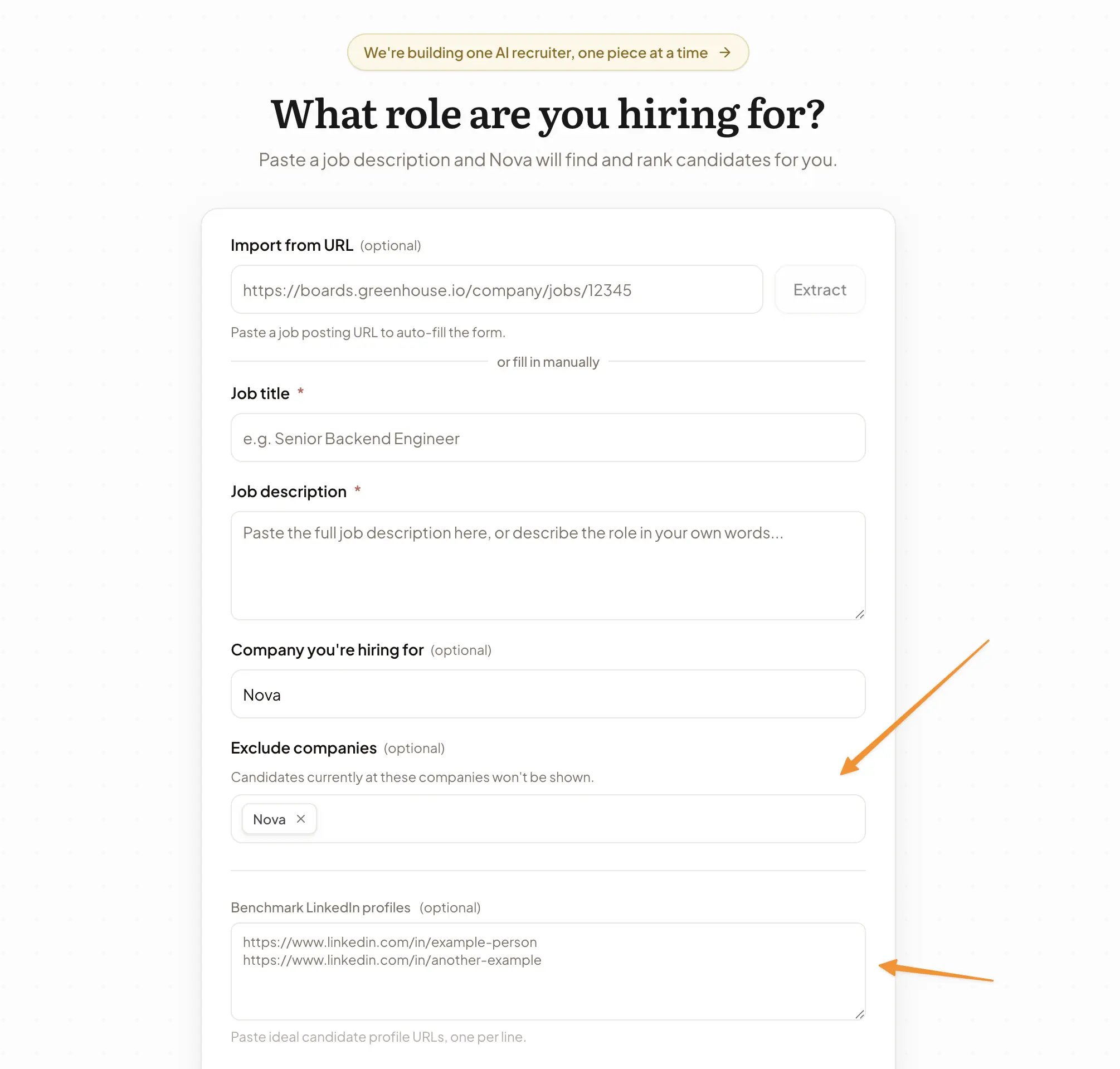
The **Benchmark LinkedIn profiles** field is now on the search setup form for every company. Paste profiles of your ideal candidates and Nova finds more people like them.
It sits next to **Exclude companies**, where you list employers whose current staff Nova should leave out.
 ### AI Outbound Talent Search: Deeper, sourced market research
Nova's market maps now go deeper and show their work. Market research returns a larger set of companies per map, each finding carries its source and date, and your own company no longer appears in its own competitive landscape.
Nova can also look things up on the web during a search, not just at the start. A few ways to use it:
* "Have you heard of Northwind Robotics? Our client sees them as their closest competitor." Nova verifies who they are and works out what that means for the search.
* "The best profile so far is this Head of Growth. Find me people from companies like hers." Nova maps the similar-company universe before searching it, instead of guessing.
* Paste your target or off-limits company list and Nova researches the names it doesn't know, flags subsidiaries and aliases, and keeps excluded employers out of every future search.
* "Candidates keep telling us the salary is under market." Nova checks title and pay bands for the role so you can take evidence to the hiring manager instead of a hunch.
### AI Outbound Talent Search: Exclude current employees from a search
When you start from a pasted job description or imported URL, you can list companies whose current employees Nova should leave out of an outbound search.
### AI Outbound Talent Search: Reveal personal emails from shortlists
Shortlisted candidates now have personal email reveal alongside phone reveal, so you can choose the right outreach channel without leaving Talent Search.
### AI Outbound Talent Search: Phone reveals are now available
Phone reveal is now available in Outbound Search. When a candidate has an available phone number, you can reveal it directly from their card and continue your outreach workflow without leaving Nova.
### AI Outbound Talent Search: Phone number reveal
You can now reveal candidate phone numbers directly in Talent Search. Open a candidate profile, reveal the available phone number, and use it in your existing outreach flow without leaving Nova.
### AI Outbound Talent Search: Talent pipeline UI and UX improvements
We've made the Talent Pipeline easier to scan, manage, and work through. The latest update tightens the pipeline layout, candidate cards, and day-to-day interactions so teams can review profiles faster and move candidates through stages with less friction.
### AI Outbound Talent Search: Ask Nova to clean up your candidate pipeline
You can now ask Nova to act on the candidates it has already found, using the same language you'd use with a sourcer:
* "Remove candidates who currently work at TrustedIQ."
* "Archive anyone outside London."
* "Re-score the MAYBE candidates with the new seniority guidance."
* "Bring back the candidate Nova archived earlier."
### Analytics: Clearer skipped-application cards in job analytics
The job analytics dialog now breaks skipped applicants into separate **Invalid Stage** and **Invalid Application** cards, alongside the total skipped count. That makes it easier to see whether Nova skipped someone because they were in the wrong ATS stage, because the application disappeared, or because something else like a resume issue got in the way.
### AI Outbound Talent Search: Tabbed candidate cards with work experience
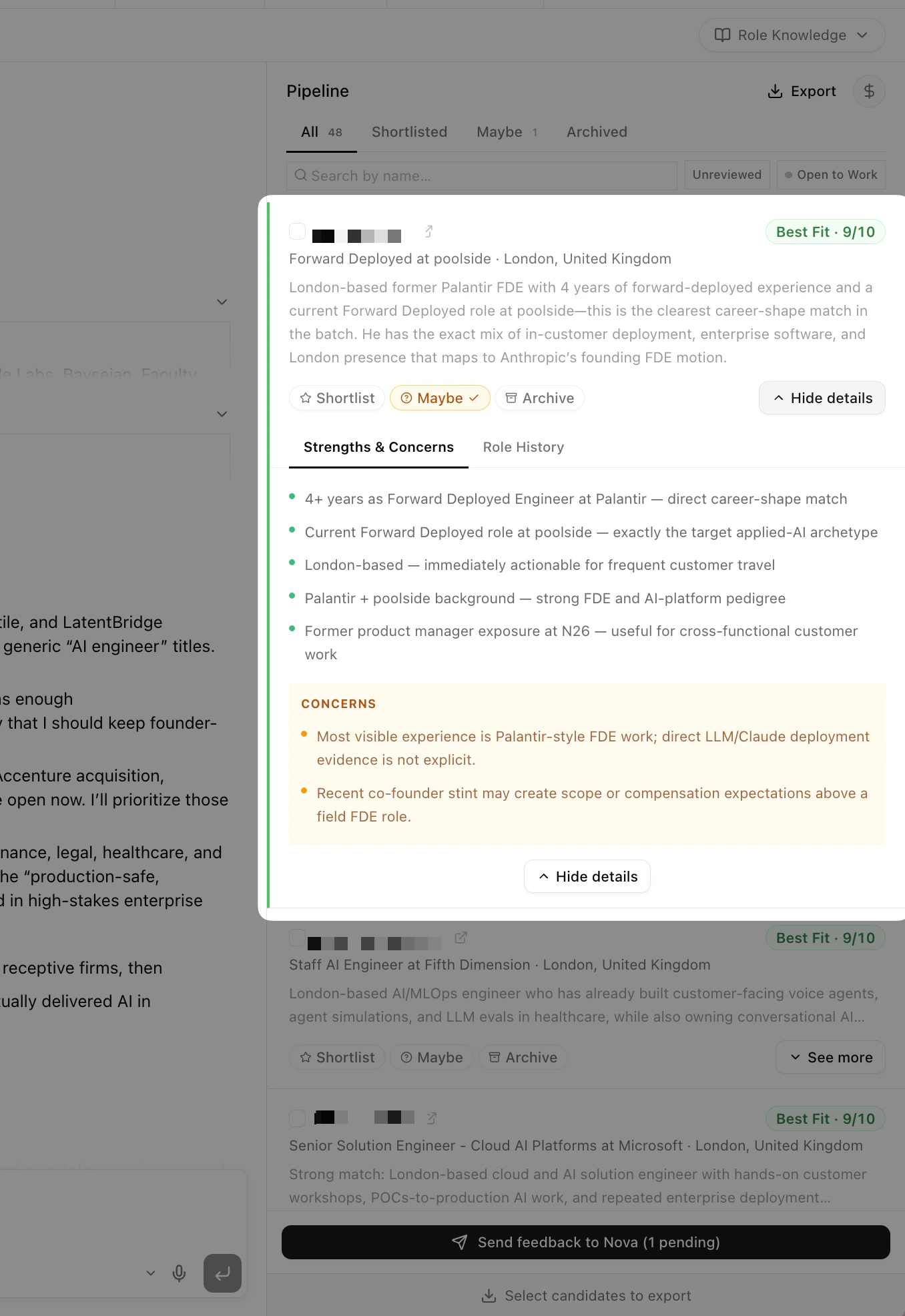
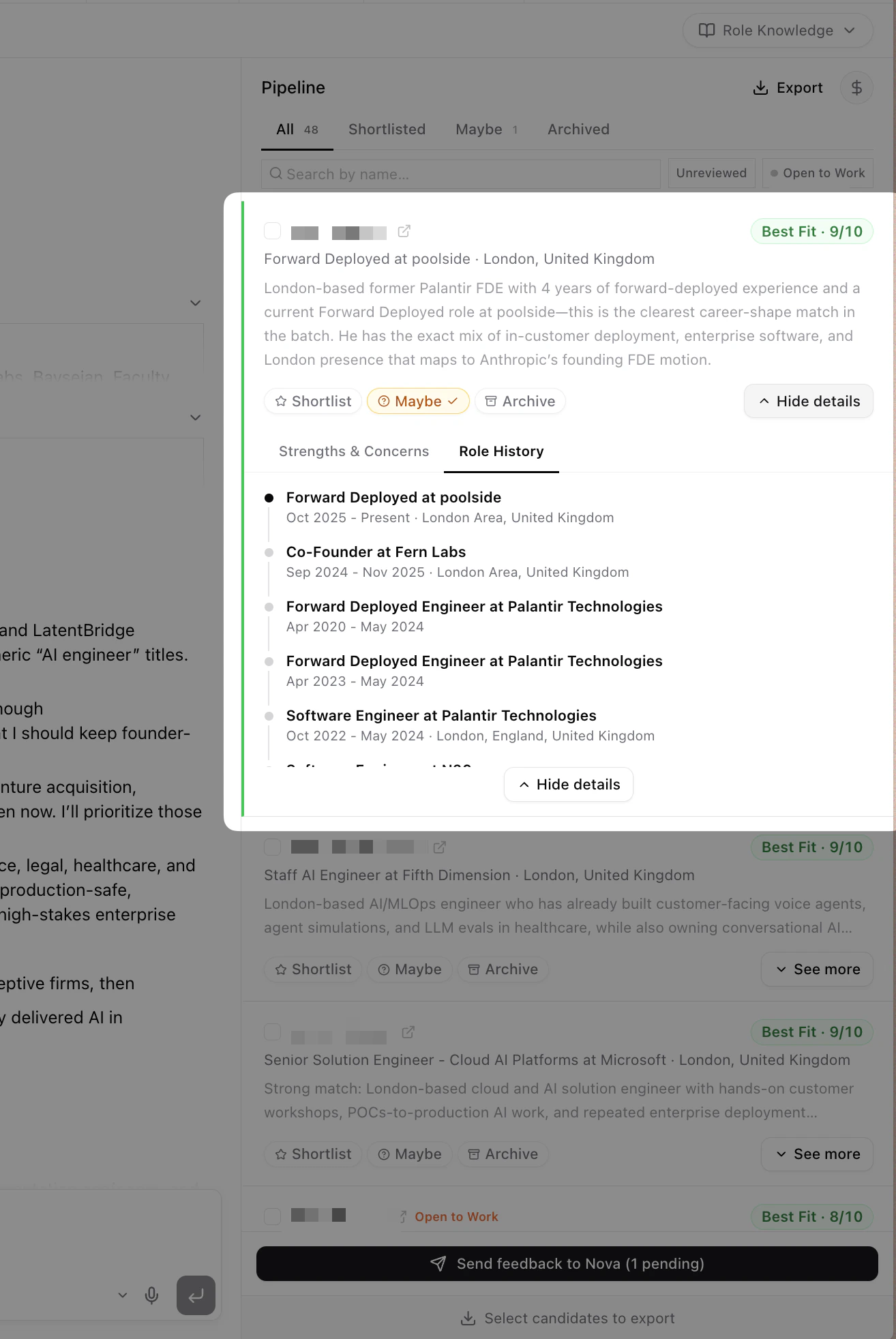
Expanded pipeline cards now use two tabs: **Strengths & Concerns** (the default) and **Work Experience**. The work experience tab shows the full work timeline with titles, companies, date ranges, and locations.
### AI Outbound Talent Search: Deeper, sourced market research
Nova's market maps now go deeper and show their work. Market research returns a larger set of companies per map, each finding carries its source and date, and your own company no longer appears in its own competitive landscape.
Nova can also look things up on the web during a search, not just at the start. A few ways to use it:
* "Have you heard of Northwind Robotics? Our client sees them as their closest competitor." Nova verifies who they are and works out what that means for the search.
* "The best profile so far is this Head of Growth. Find me people from companies like hers." Nova maps the similar-company universe before searching it, instead of guessing.
* Paste your target or off-limits company list and Nova researches the names it doesn't know, flags subsidiaries and aliases, and keeps excluded employers out of every future search.
* "Candidates keep telling us the salary is under market." Nova checks title and pay bands for the role so you can take evidence to the hiring manager instead of a hunch.
### AI Outbound Talent Search: Exclude current employees from a search
When you start from a pasted job description or imported URL, you can list companies whose current employees Nova should leave out of an outbound search.
### AI Outbound Talent Search: Reveal personal emails from shortlists
Shortlisted candidates now have personal email reveal alongside phone reveal, so you can choose the right outreach channel without leaving Talent Search.
### AI Outbound Talent Search: Phone reveals are now available
Phone reveal is now available in Outbound Search. When a candidate has an available phone number, you can reveal it directly from their card and continue your outreach workflow without leaving Nova.
### AI Outbound Talent Search: Phone number reveal
You can now reveal candidate phone numbers directly in Talent Search. Open a candidate profile, reveal the available phone number, and use it in your existing outreach flow without leaving Nova.
### AI Outbound Talent Search: Talent pipeline UI and UX improvements
We've made the Talent Pipeline easier to scan, manage, and work through. The latest update tightens the pipeline layout, candidate cards, and day-to-day interactions so teams can review profiles faster and move candidates through stages with less friction.
### AI Outbound Talent Search: Ask Nova to clean up your candidate pipeline
You can now ask Nova to act on the candidates it has already found, using the same language you'd use with a sourcer:
* "Remove candidates who currently work at TrustedIQ."
* "Archive anyone outside London."
* "Re-score the MAYBE candidates with the new seniority guidance."
* "Bring back the candidate Nova archived earlier."
### Analytics: Clearer skipped-application cards in job analytics
The job analytics dialog now breaks skipped applicants into separate **Invalid Stage** and **Invalid Application** cards, alongside the total skipped count. That makes it easier to see whether Nova skipped someone because they were in the wrong ATS stage, because the application disappeared, or because something else like a resume issue got in the way.
### AI Outbound Talent Search: Tabbed candidate cards with work experience
Expanded pipeline cards now use two tabs: **Strengths & Concerns** (the default) and **Work Experience**. The work experience tab shows the full work timeline with titles, companies, date ranges, and locations.
 ### AI Outbound Talent Search: Durable workspace files and downloadable reports
Nova can now keep working files inside each search session instead of burying everything in the chat. That gives you one place to inspect the agent's working memory, review shareable docs, and download what you want to send on.
#### System files you can inspect
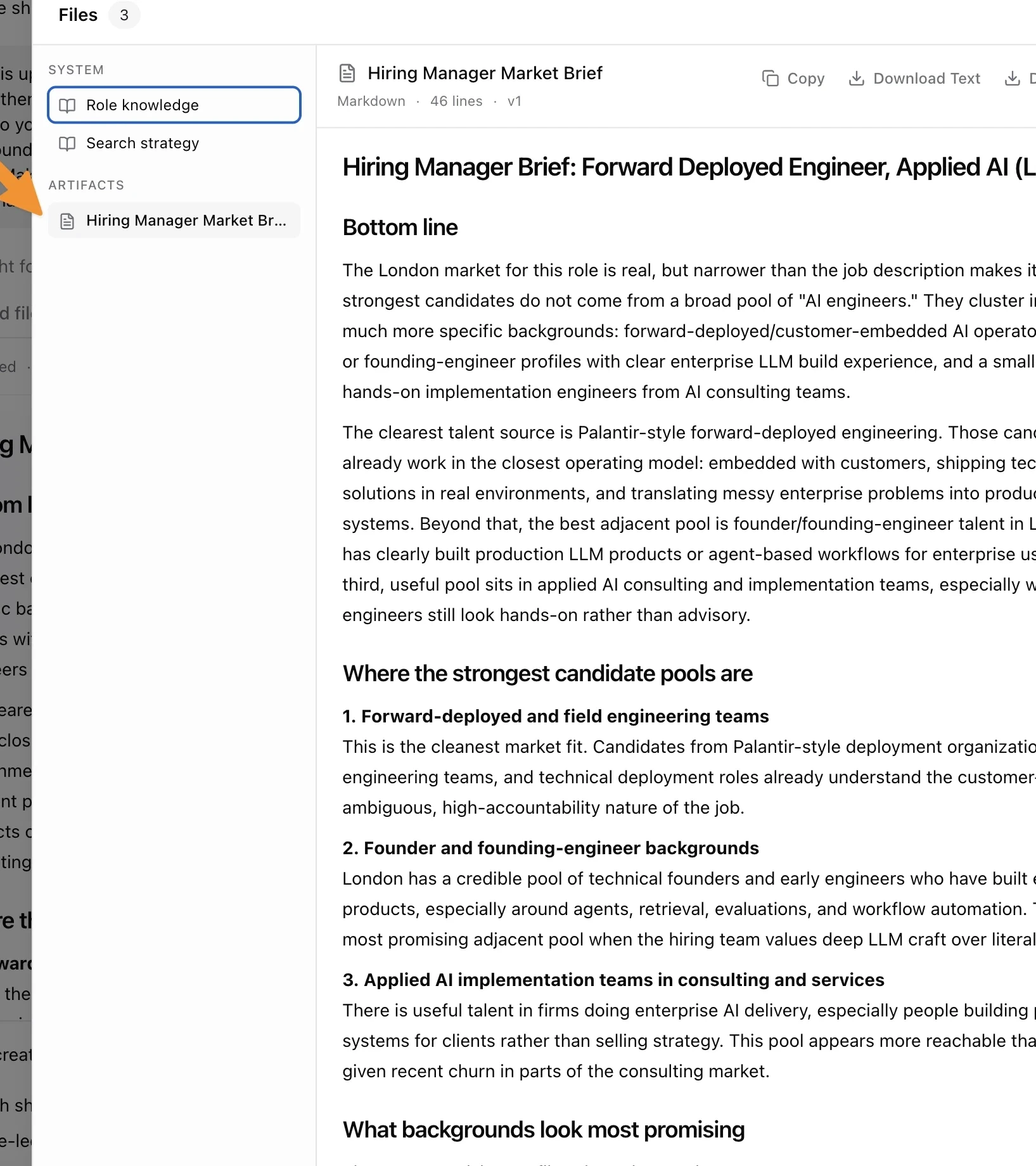
Each search now keeps its internal working docs in the new **Files** view. The two main system files are:
* **Role knowledge**: the agent's current understanding of what matters for the role
* **Search strategy**: the live working plan for where Nova is looking and what it is deprioritizing
You can open either file at any point during the search to see how the search is being steered.
### AI Outbound Talent Search: Durable workspace files and downloadable reports
Nova can now keep working files inside each search session instead of burying everything in the chat. That gives you one place to inspect the agent's working memory, review shareable docs, and download what you want to send on.
#### System files you can inspect
Each search now keeps its internal working docs in the new **Files** view. The two main system files are:
* **Role knowledge**: the agent's current understanding of what matters for the role
* **Search strategy**: the live working plan for where Nova is looking and what it is deprioritizing
You can open either file at any point during the search to see how the search is being steered.
 #### Shareable docs that persist with the search
You can also ask Nova to write a document for you, for example a market brief or a hiring-manager summary. Those docs now persist as files instead of disappearing into one chat response.
Open a file to preview it, copy the text, download the text version, or export it as a PDF when you need to share it outside Nova. These docs are now written more like standalone briefs and less like cleaned-up chat transcripts.
#### Chat cards vs the Files view
File cards in the chat now preserve the version that existed at that moment in the conversation. The **Files** view always shows the latest version.
That means you can use the chat to understand how a document evolved, then open **Files** when you want the current working version.
#### Shareable docs that persist with the search
You can also ask Nova to write a document for you, for example a market brief or a hiring-manager summary. Those docs now persist as files instead of disappearing into one chat response.
Open a file to preview it, copy the text, download the text version, or export it as a PDF when you need to share it outside Nova. These docs are now written more like standalone briefs and less like cleaned-up chat transcripts.
#### Chat cards vs the Files view
File cards in the chat now preserve the version that existed at that moment in the conversation. The **Files** view always shows the latest version.
That means you can use the chat to understand how a document evolved, then open **Files** when you want the current working version.
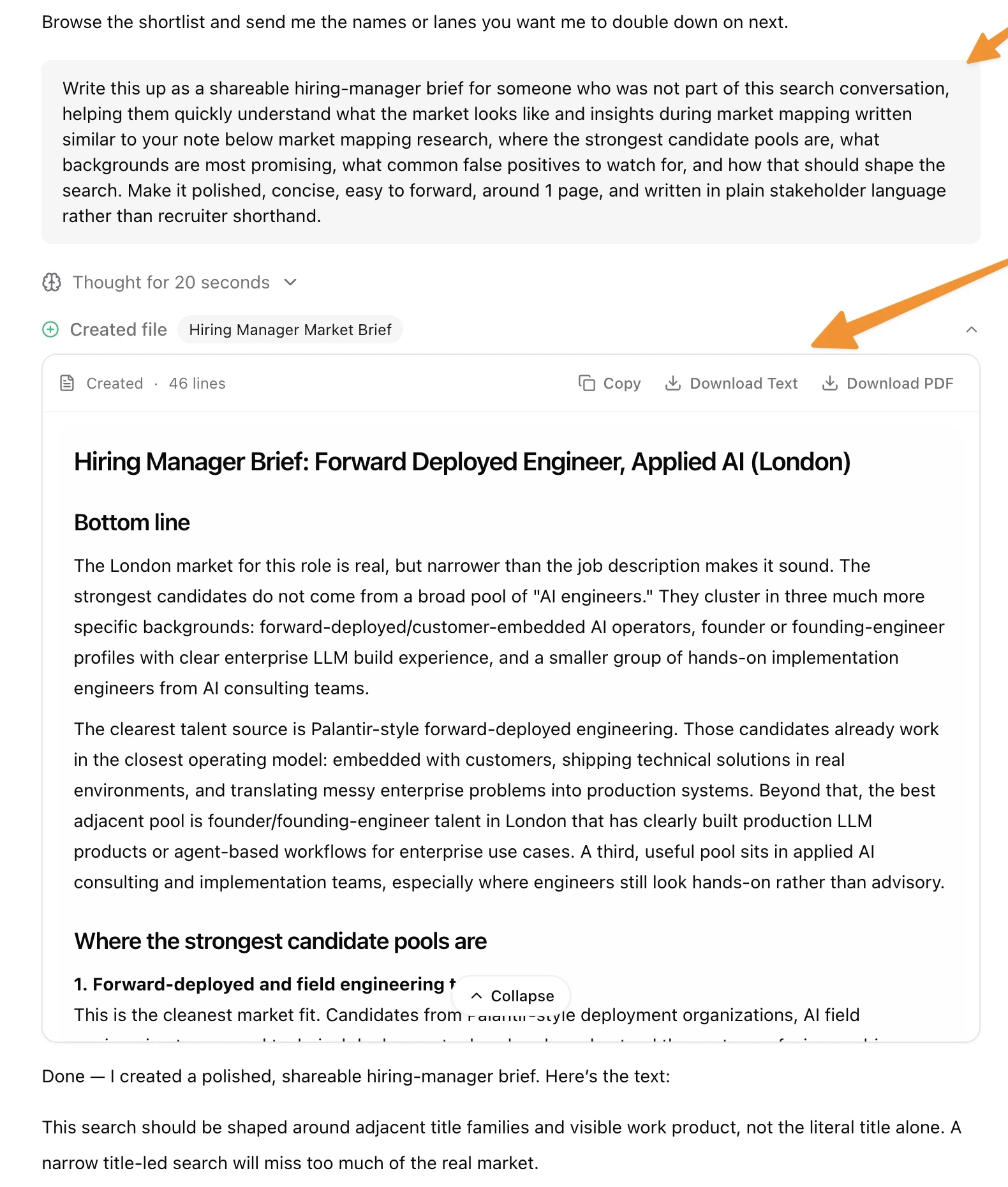 #### Cleaner role knowledge updates
Role knowledge updates are now easier to read in chat. Instead of raw shell output, Nova shows a clearer update card so you can quickly see what changed and open the underlying file if you want the full document.
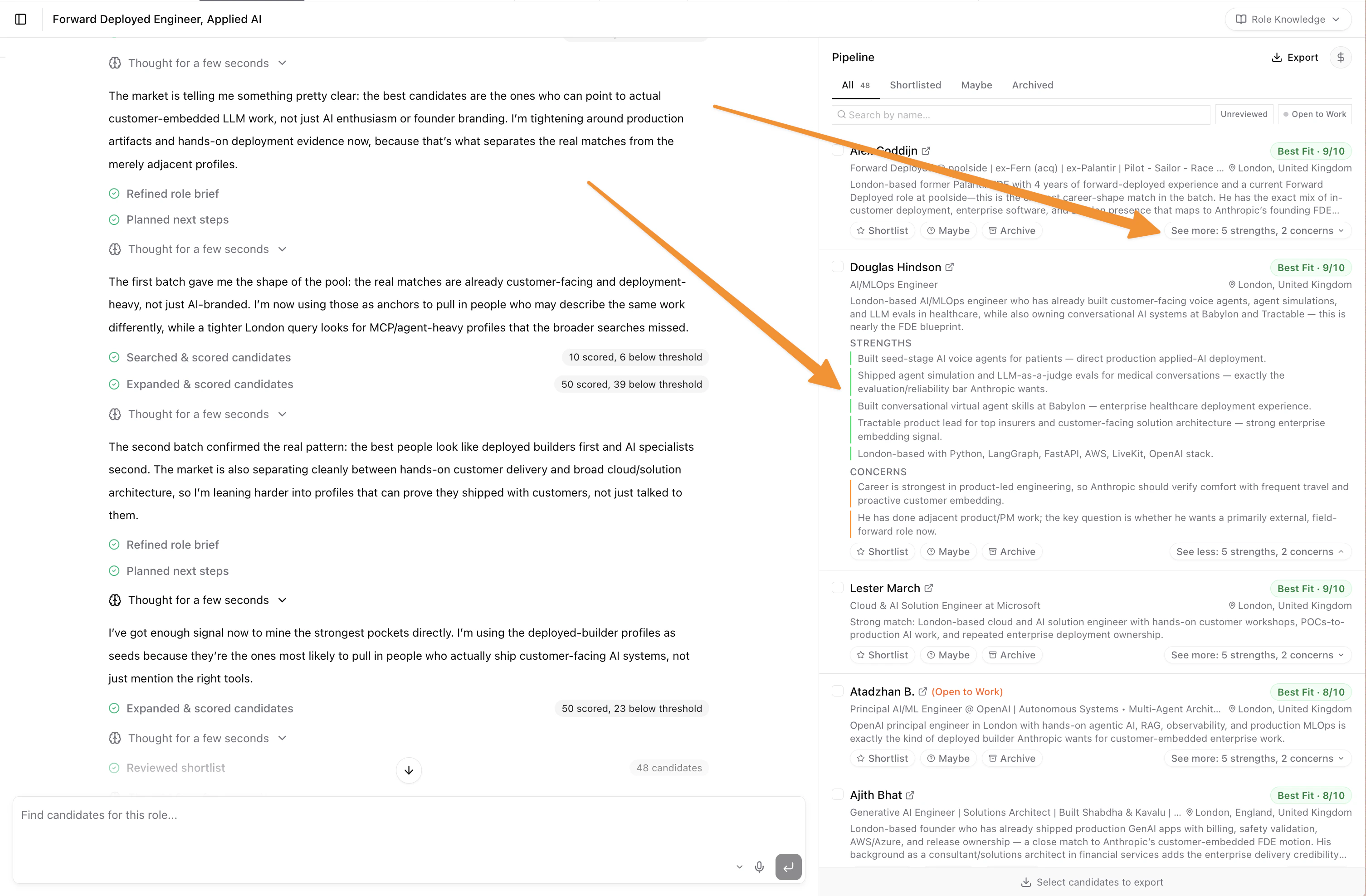
### AI Outbound Talent Search: Pipeline cards now show why someone fits, and what to watch
The pipeline sidebar now gives you more of the scoring story inline. Candidate cards expand to show the strongest signals behind a good score, plus the 1 to 2 concerns holding someone back from a perfect 10/10, so you can triage tradeoffs without opening every profile.
Those same concerns also show up in the agent's checkpoint summary table under a new **Must Watch** column, so you can scan caveats while the search is still running. We also tightened the card scan pattern: fit badges now stand out more clearly, and the short summary is written as a role-specific outreach pitch instead of a generic profile recap.
#### Cleaner role knowledge updates
Role knowledge updates are now easier to read in chat. Instead of raw shell output, Nova shows a clearer update card so you can quickly see what changed and open the underlying file if you want the full document.
### AI Outbound Talent Search: Pipeline cards now show why someone fits, and what to watch
The pipeline sidebar now gives you more of the scoring story inline. Candidate cards expand to show the strongest signals behind a good score, plus the 1 to 2 concerns holding someone back from a perfect 10/10, so you can triage tradeoffs without opening every profile.
Those same concerns also show up in the agent's checkpoint summary table under a new **Must Watch** column, so you can scan caveats while the search is still running. We also tightened the card scan pattern: fit badges now stand out more clearly, and the short summary is written as a role-specific outreach pitch instead of a generic profile recap.
 ### AI Outbound Talent Search: Location scoring follows recruiter intent
Candidate scoring now picks up on nuanced location constraints from your conversation. If you tell the agent "relocation is fine for senior candidates" or "DACH preferred but UK works too," scoring reflects that instead of treating location as a binary pass/fail against a single city.
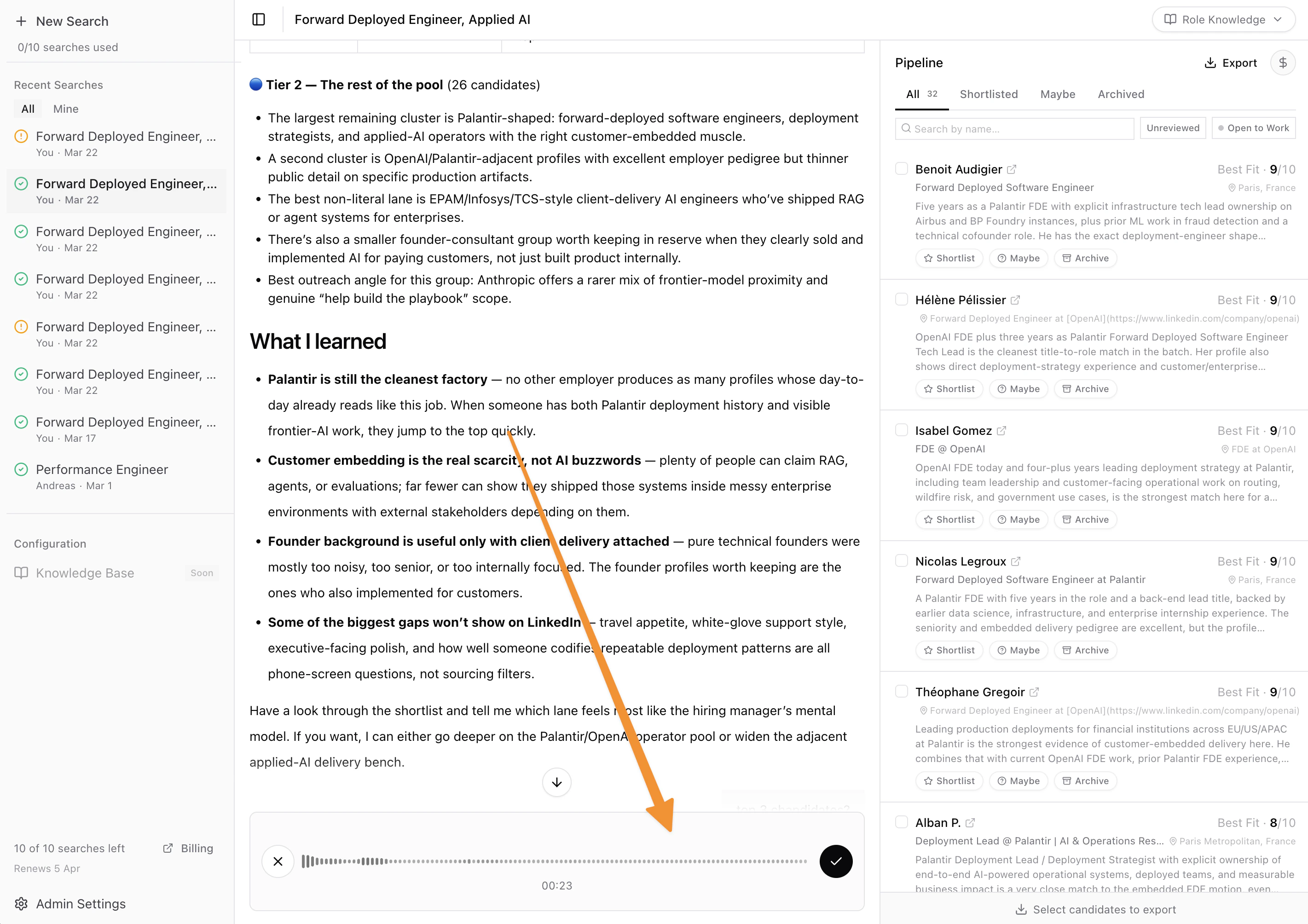
### Voice input for Criteria Builder and Talent Search
You can now dictate your requirements instead of typing in both the criteria builder and talent search conversations. Click the microphone button in the text input, speak, and Nova transcribes your words into text. If you press Send while still recording, your speech is transcribed and submitted together with any text you already typed.
### AI Outbound Talent Search: Location scoring follows recruiter intent
Candidate scoring now picks up on nuanced location constraints from your conversation. If you tell the agent "relocation is fine for senior candidates" or "DACH preferred but UK works too," scoring reflects that instead of treating location as a binary pass/fail against a single city.
### Voice input for Criteria Builder and Talent Search
You can now dictate your requirements instead of typing in both the criteria builder and talent search conversations. Click the microphone button in the text input, speak, and Nova transcribes your words into text. If you press Send while still recording, your speech is transcribed and submitted together with any text you already typed.
 ### AI Outbound Talent Search: Sharper geographic targeting for niche roles
Location-constrained searches now return candidates who are actually in the right place. Previously, a hybrid London role could surface strong technical matches from Amsterdam or Berlin because brand names in the search query overpowered the location signal.
The search agent now builds queries that put geography first and describes the niche with skill keywords instead of company names. For a "seamless activewear garment technologist in London" search, this took London-based results from 20% to 100%, while also returning better role matches (actual garment technologists, not department managers who happen to work at the right brand).
The same fix sharpened regional and timezone searches. Queries for "DACH region" or "LATAM with Pacific Time overlap" now translate those constraints into concrete city and country names that the search engine understands, instead of relying on abstract labels.
### Lever Integration: Sourced candidates now scored via LinkedIn profiles
When a Lever candidate has no uploaded resume but their profile includes a LinkedIn URL, Nova now pulls their LinkedIn data and scores them against your criteria. Previously these candidates were skipped entirely.
### AI Outbound Talent Search: Per-user search quotas
Account admins can now split outbound search credits across individual team members from the Team page. Turn on per-user quotas, set each recruiter's allocation, and see usage in one place, including pending invite reservations.
Recruiters now see their own personal usage on the search page instead of only the company total. When they hit their limit, they can request more credits and Nova emails the company's Owners and Admins with a link back to the Team page.
### AI Outbound Talent Search: Pipeline sidebar for faster candidate triage
The shortlist sidebar is now a pipeline. You can sort candidates into Shortlisted, Maybe, or Archived without losing the full list, and each card keeps LinkedIn signals like Open to Work, location, and fit score visible while you review.
We also sanded down the card layout so it scans faster: bigger score labels, headline and location on one clean row, always-visible stage buttons, and a simple way to clear a decision back to unreviewed.
### AI Outbound Talent Search: Sharper geographic targeting for niche roles
Location-constrained searches now return candidates who are actually in the right place. Previously, a hybrid London role could surface strong technical matches from Amsterdam or Berlin because brand names in the search query overpowered the location signal.
The search agent now builds queries that put geography first and describes the niche with skill keywords instead of company names. For a "seamless activewear garment technologist in London" search, this took London-based results from 20% to 100%, while also returning better role matches (actual garment technologists, not department managers who happen to work at the right brand).
The same fix sharpened regional and timezone searches. Queries for "DACH region" or "LATAM with Pacific Time overlap" now translate those constraints into concrete city and country names that the search engine understands, instead of relying on abstract labels.
### Lever Integration: Sourced candidates now scored via LinkedIn profiles
When a Lever candidate has no uploaded resume but their profile includes a LinkedIn URL, Nova now pulls their LinkedIn data and scores them against your criteria. Previously these candidates were skipped entirely.
### AI Outbound Talent Search: Per-user search quotas
Account admins can now split outbound search credits across individual team members from the Team page. Turn on per-user quotas, set each recruiter's allocation, and see usage in one place, including pending invite reservations.
Recruiters now see their own personal usage on the search page instead of only the company total. When they hit their limit, they can request more credits and Nova emails the company's Owners and Admins with a link back to the Team page.
### AI Outbound Talent Search: Pipeline sidebar for faster candidate triage
The shortlist sidebar is now a pipeline. You can sort candidates into Shortlisted, Maybe, or Archived without losing the full list, and each card keeps LinkedIn signals like Open to Work, location, and fit score visible while you review.
We also sanded down the card layout so it scans faster: bigger score labels, headline and location on one clean row, always-visible stage buttons, and a simple way to clear a decision back to unreviewed.
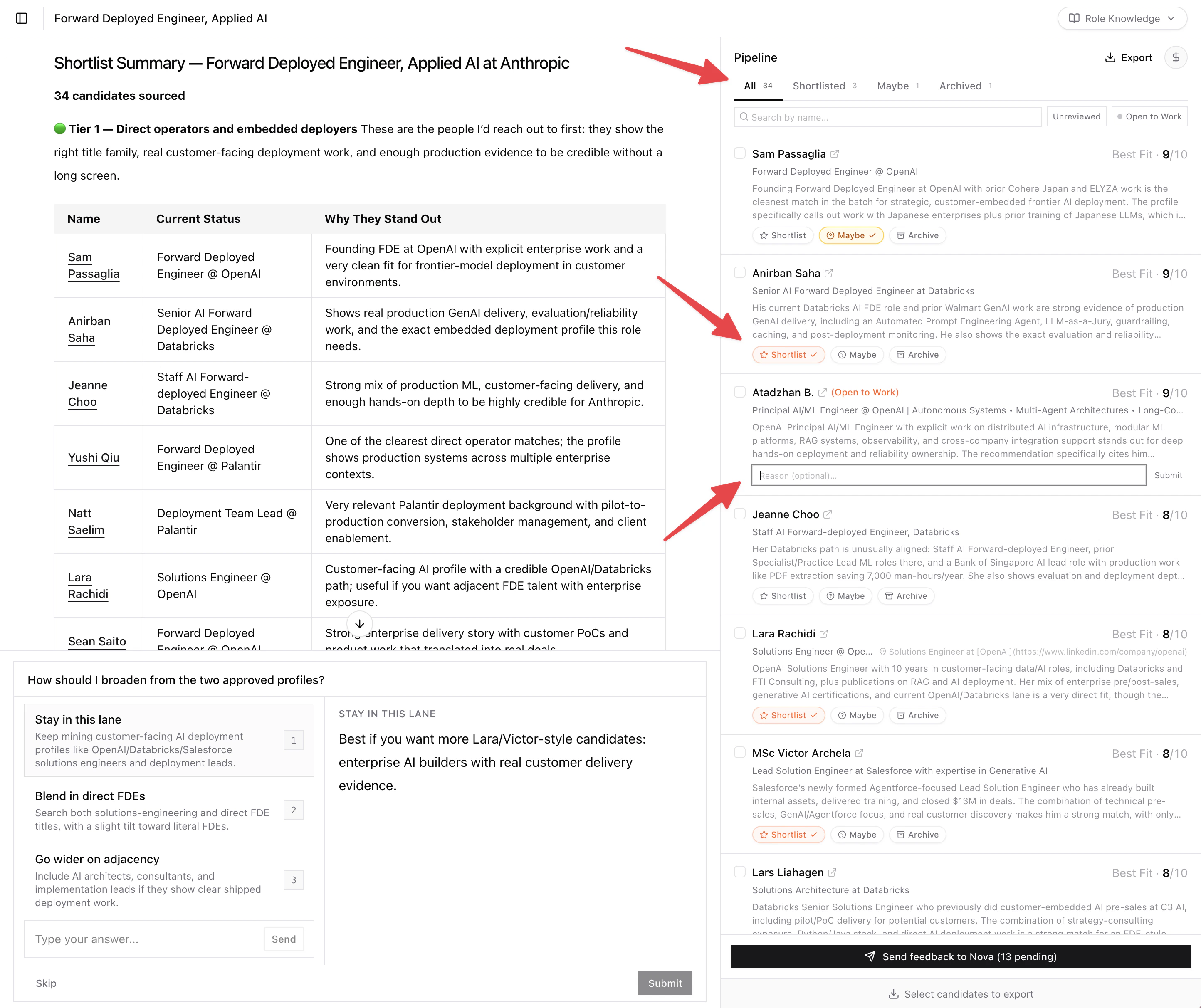 ### AI Outbound Talent Search: LinkedIn availability and location on candidate cards
Top-scoring candidates now show LinkedIn profile data on their cards. If someone has set themselves as "Open to Work" on LinkedIn, you'll see it next to their name. Their city and country show on the headline row, so you can scan location fit without opening profiles.
Filter to just "Open to Work" candidates with the toggle next to the fit filter.
### AI Outbound Talent Search: Fewer fake and keyword-stuffed profiles
The scoring engine now catches a common spam pattern on LinkedIn: profiles with headlines listing 10+ pipe-separated buzzwords ("Python | Django | Flask | FastAPI | AI/ML | LangChain | RAG | Docker | ...") but only generic, vague experience bullets underneath. These profiles previously scored well because they matched every keyword the role asked for.
Now the scorer strips the headline and evaluates based on described work alone. If the experience section doesn't show real ownership, metrics, or named systems, the headline keywords don't count.
### AI Outbound Talent Search: Clearer candidate feedback
The shortlist sidebar now shows explicit **Agree** and **Disagree** buttons on each candidate card. One click to confirm the AI's assessment, or click Disagree to pick the correct fit level and tell the agent why. Feedback stays inline (no popover blocking other cards) and feeds into the "Refine search" loop.
Previously, feedback was a pair of tiny thumbs icons that most users didn't notice.
### AI Outbound Talent Search: Better seniority calibration
Nova now catches seniority mismatches earlier in a search. When candidates consistently come back above the target level, the agent flags it and asks you to confirm what seniority band you're actually hiring for. Once you answer, scoring treats that band as a hard constraint, not a soft preference.
This fixes a pattern where the agent would surface strong but overqualified candidates (think Head of IT profiles for a Manager-level search) because their richer LinkedIn profiles scored well on paper. The scoring engine now checks seniority fit before qualification depth when you've set a target level, so a concise profile at the right level beats a verbose one at the wrong level.
### AI Outbound Talent Search: Smarter LinkedIn search on harder roles
Nova now uses a richer search program when a role is too nuanced for one literal LinkedIn query. Clean, exact-title searches still stay fast. Broader, more ambiguous roles can now search through a compact pack of alternate phrasings so the agent finds adjacent but relevant profiles without blindly widening every search.
For example, a clean SAP consultant search can still go straight after one tight title-led query, while a harder DACH channel search can fan out across alternate phrasings like vendor-side channel managers, distributor-heavy partner operators, and adjacent employer lanes without mixing those into one bloated query.
### AI Outbound Talent Search: Simpler market research before search
Nova now spends its pre-search research on the signals that actually change where it looks next: target companies, receptivity signals, talent movement, domain cues, and hidden specialist firms when they matter. It no longer burns time on brittle role-holder lookups before it starts sourcing.
For a DACH channel search in cybersecurity, that means spending time on signals like Palo Alto or Cisco restructuring, Dragos hiring from Claroty, or Belden and TXOne showing up as stronger talent pools, instead of trying to pre-find a handful of current role holders before the first search.
### AI Outbound Talent Search: Visible market intelligence in the chat
After Nova finishes its market research, you now get a short market intelligence brief right in the conversation before candidate search starts. It pulls together signals like layoffs, acquisitions, competitor movement, and likely talent pools into plain language so you can see why the next search goes where it does.
For example, instead of only seeing tool cards, you might now see a brief that says Dragos is actively pulling talent from Claroty, or that post-acquisition disruption at a target company could create an outreach window, before Nova starts sourcing.
### AI Outbound Talent Search: Expandable market research cards
Market research results now show as collapsible cards in the chat. A blurred preview peeks out when collapsed; click to expand and see the full synthesis, mapped companies, receptivity signals, talent movement, and domain signals. Works on existing sessions too, no re-run needed.
### AI Outbound Talent Search: Smarter market mapping for specialist roles
Nova can now go deeper on specialist searches before it touches LinkedIn. It still maps companies and receptivity by default, then adds talent-movement analysis or public domain signals when those would materially change the search strategy, target employers, or search vocabulary.
On a specialist OT cybersecurity search, Nova can use public domain signals to pick up terms, employers, and market cues that a generic title search would miss. On a more leadership-shaped search, it can instead look at where relevant operators tend to move between companies and use that to prioritize exporter and importer lanes.
### AI Outbound Talent Search: Market intelligence before the first search
The agent now runs deep web research before touching LinkedIn: mapping competitor companies, pulling receptivity signals (layoffs, restructuring, leadership changes), and building a clearer read on the market before the first search.
For a Certification Architect search at Anthropic, it mapped 7 target companies across 21 sources and flagged AWS layoffs as a priority outreach signal before any LinkedIn search.
### AI Outbound Talent Search: LinkedIn availability and location on candidate cards
Top-scoring candidates now show LinkedIn profile data on their cards. If someone has set themselves as "Open to Work" on LinkedIn, you'll see it next to their name. Their city and country show on the headline row, so you can scan location fit without opening profiles.
Filter to just "Open to Work" candidates with the toggle next to the fit filter.
### AI Outbound Talent Search: Fewer fake and keyword-stuffed profiles
The scoring engine now catches a common spam pattern on LinkedIn: profiles with headlines listing 10+ pipe-separated buzzwords ("Python | Django | Flask | FastAPI | AI/ML | LangChain | RAG | Docker | ...") but only generic, vague experience bullets underneath. These profiles previously scored well because they matched every keyword the role asked for.
Now the scorer strips the headline and evaluates based on described work alone. If the experience section doesn't show real ownership, metrics, or named systems, the headline keywords don't count.
### AI Outbound Talent Search: Clearer candidate feedback
The shortlist sidebar now shows explicit **Agree** and **Disagree** buttons on each candidate card. One click to confirm the AI's assessment, or click Disagree to pick the correct fit level and tell the agent why. Feedback stays inline (no popover blocking other cards) and feeds into the "Refine search" loop.
Previously, feedback was a pair of tiny thumbs icons that most users didn't notice.
### AI Outbound Talent Search: Better seniority calibration
Nova now catches seniority mismatches earlier in a search. When candidates consistently come back above the target level, the agent flags it and asks you to confirm what seniority band you're actually hiring for. Once you answer, scoring treats that band as a hard constraint, not a soft preference.
This fixes a pattern where the agent would surface strong but overqualified candidates (think Head of IT profiles for a Manager-level search) because their richer LinkedIn profiles scored well on paper. The scoring engine now checks seniority fit before qualification depth when you've set a target level, so a concise profile at the right level beats a verbose one at the wrong level.
### AI Outbound Talent Search: Smarter LinkedIn search on harder roles
Nova now uses a richer search program when a role is too nuanced for one literal LinkedIn query. Clean, exact-title searches still stay fast. Broader, more ambiguous roles can now search through a compact pack of alternate phrasings so the agent finds adjacent but relevant profiles without blindly widening every search.
For example, a clean SAP consultant search can still go straight after one tight title-led query, while a harder DACH channel search can fan out across alternate phrasings like vendor-side channel managers, distributor-heavy partner operators, and adjacent employer lanes without mixing those into one bloated query.
### AI Outbound Talent Search: Simpler market research before search
Nova now spends its pre-search research on the signals that actually change where it looks next: target companies, receptivity signals, talent movement, domain cues, and hidden specialist firms when they matter. It no longer burns time on brittle role-holder lookups before it starts sourcing.
For a DACH channel search in cybersecurity, that means spending time on signals like Palo Alto or Cisco restructuring, Dragos hiring from Claroty, or Belden and TXOne showing up as stronger talent pools, instead of trying to pre-find a handful of current role holders before the first search.
### AI Outbound Talent Search: Visible market intelligence in the chat
After Nova finishes its market research, you now get a short market intelligence brief right in the conversation before candidate search starts. It pulls together signals like layoffs, acquisitions, competitor movement, and likely talent pools into plain language so you can see why the next search goes where it does.
For example, instead of only seeing tool cards, you might now see a brief that says Dragos is actively pulling talent from Claroty, or that post-acquisition disruption at a target company could create an outreach window, before Nova starts sourcing.
### AI Outbound Talent Search: Expandable market research cards
Market research results now show as collapsible cards in the chat. A blurred preview peeks out when collapsed; click to expand and see the full synthesis, mapped companies, receptivity signals, talent movement, and domain signals. Works on existing sessions too, no re-run needed.
### AI Outbound Talent Search: Smarter market mapping for specialist roles
Nova can now go deeper on specialist searches before it touches LinkedIn. It still maps companies and receptivity by default, then adds talent-movement analysis or public domain signals when those would materially change the search strategy, target employers, or search vocabulary.
On a specialist OT cybersecurity search, Nova can use public domain signals to pick up terms, employers, and market cues that a generic title search would miss. On a more leadership-shaped search, it can instead look at where relevant operators tend to move between companies and use that to prioritize exporter and importer lanes.
### AI Outbound Talent Search: Market intelligence before the first search
The agent now runs deep web research before touching LinkedIn: mapping competitor companies, pulling receptivity signals (layoffs, restructuring, leadership changes), and building a clearer read on the market before the first search.
For a Certification Architect search at Anthropic, it mapped 7 target companies across 21 sources and flagged AWS layoffs as a priority outreach signal before any LinkedIn search.
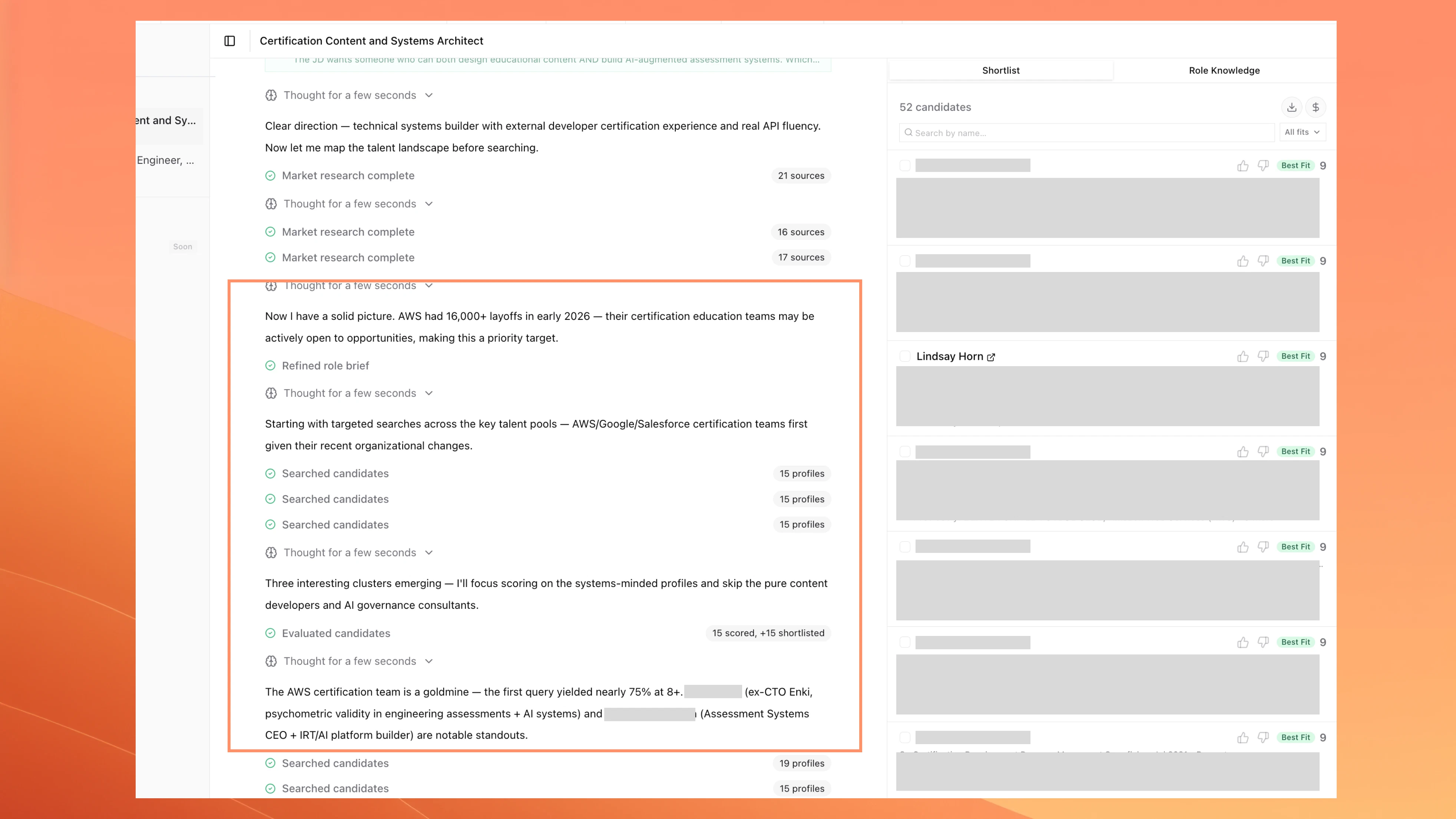 ### AI Outbound Talent Search: Role knowledge sidebar
New "Role Knowledge" tab in the sidebar shows the agent's accumulated intelligence. Updates live as the agent works.
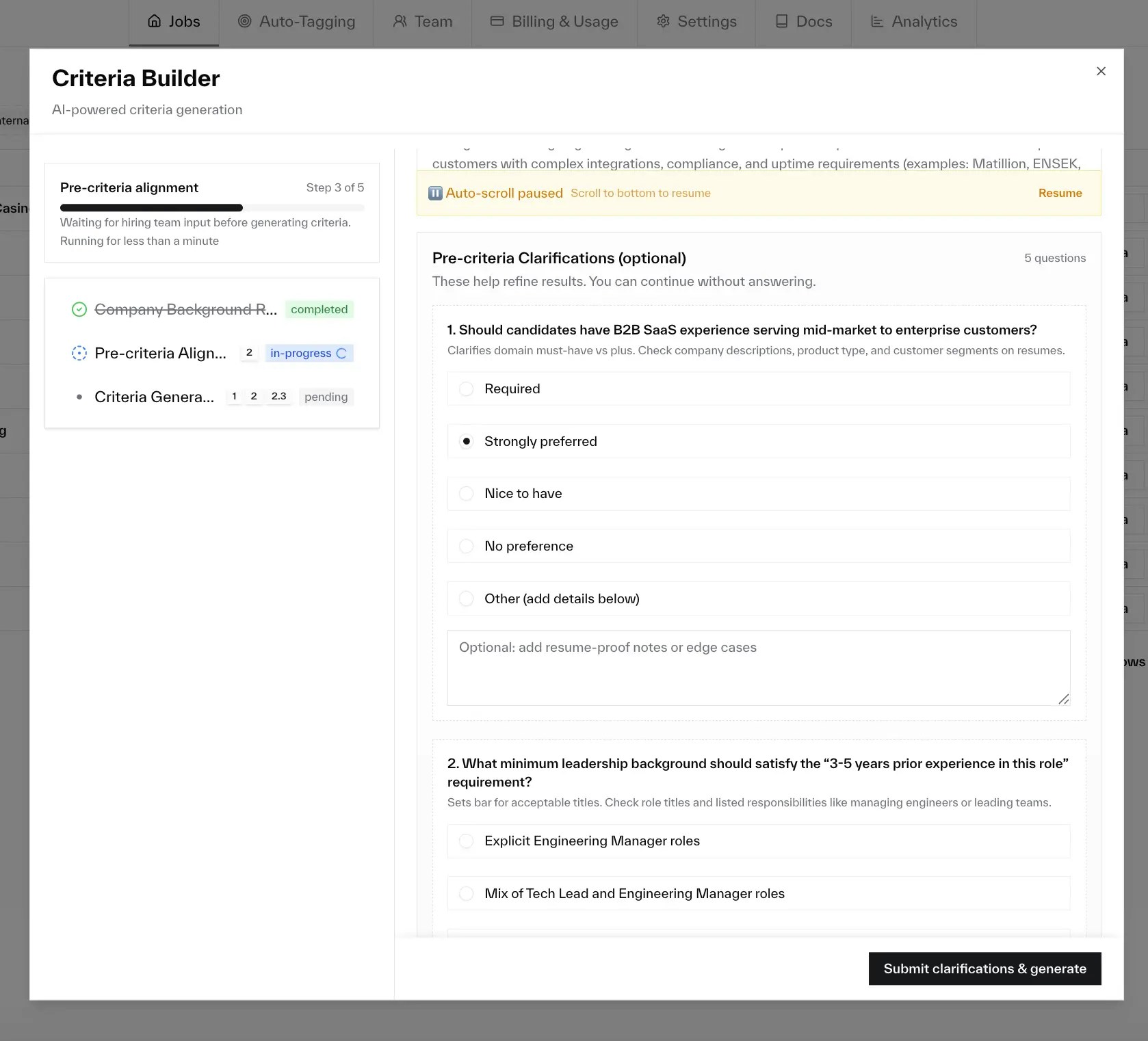
### Criteria Builder: Live calibration against real candidates
Nova scores a sample of your actual applicants in the conversation. Click any row for per-criterion scores and evidence. If something's off, Nova proposes the edit inline and re-scores automatically.
### Criteria Builder: Visual previews on questions
Structured questions now show a markdown preview of what each option would change.
### AI Outbound Talent Search: Import a job from any URL
Paste a link to a job posting on Greenhouse, Lever, or any job board and Nova extracts the title, company, and description.
### AI Outbound Talent Search: Feedback refinement loop
Thumbs up/down on shortlisted candidates, then click "Refine search." The agent runs targeted follow-up searches based on your feedback. Re-scored candidates show score transitions inline.
### Talent Pool: Conversational search
Search your talent pool through conversation. Describe what you're looking for, refine with follow-ups, and build a shortlist.
### AI Outbound Talent Search: Email notification when search completes
Email when your search finishes, with a summary by fit level and a direct link to results.
### Criteria Builder: Suggested actions after each response
Clickable action buttons after each agent response. Click instead of typing.
### Fraud Detection: Fewer false positives
\~40% fewer false positives at the recommended threshold. Same detection accuracy.
### AI Outbound Talent Search: Search history on the setup page
Recent searches now appear below the setup form so you can jump back into any previous session.
### AI Outbound Talent Search: Cleaner setup page for ATS-free accounts
If your account isn't connected to an ATS, the setup page shows a single "Paste job description" form with no extra tabs.
### Criteria Builder: Smoother criteria generation
Generation now happens inside the conversation. Nova asks questions first, then generates criteria from your answers.
### Criteria Builder: Verifiability warnings
Nova flags criteria that are hard to verify from resumes alone. Adjust before scoring or move to interview checks.
### Criteria Builder: More role-specific criteria titles
Titles pick up more specific language from your job description.
### Criteria Builder: Live progress while thinking
Live timer and word count while Nova is working.
### Criteria Builder: Easier-to-read calibration results
Calibration summaries now read as plain-language analysis.
### Scoring: Stronger candidates score higher
Strong fits now receive scores that better reflect their strength.
### AI Outbound Talent Search: Watch it work end to end
### AI Outbound Talent Search: Role knowledge sidebar
New "Role Knowledge" tab in the sidebar shows the agent's accumulated intelligence. Updates live as the agent works.
### Criteria Builder: Live calibration against real candidates
Nova scores a sample of your actual applicants in the conversation. Click any row for per-criterion scores and evidence. If something's off, Nova proposes the edit inline and re-scores automatically.
### Criteria Builder: Visual previews on questions
Structured questions now show a markdown preview of what each option would change.
### AI Outbound Talent Search: Import a job from any URL
Paste a link to a job posting on Greenhouse, Lever, or any job board and Nova extracts the title, company, and description.
### AI Outbound Talent Search: Feedback refinement loop
Thumbs up/down on shortlisted candidates, then click "Refine search." The agent runs targeted follow-up searches based on your feedback. Re-scored candidates show score transitions inline.
### Talent Pool: Conversational search
Search your talent pool through conversation. Describe what you're looking for, refine with follow-ups, and build a shortlist.
### AI Outbound Talent Search: Email notification when search completes
Email when your search finishes, with a summary by fit level and a direct link to results.
### Criteria Builder: Suggested actions after each response
Clickable action buttons after each agent response. Click instead of typing.
### Fraud Detection: Fewer false positives
\~40% fewer false positives at the recommended threshold. Same detection accuracy.
### AI Outbound Talent Search: Search history on the setup page
Recent searches now appear below the setup form so you can jump back into any previous session.
### AI Outbound Talent Search: Cleaner setup page for ATS-free accounts
If your account isn't connected to an ATS, the setup page shows a single "Paste job description" form with no extra tabs.
### Criteria Builder: Smoother criteria generation
Generation now happens inside the conversation. Nova asks questions first, then generates criteria from your answers.
### Criteria Builder: Verifiability warnings
Nova flags criteria that are hard to verify from resumes alone. Adjust before scoring or move to interview checks.
### Criteria Builder: More role-specific criteria titles
Titles pick up more specific language from your job description.
### Criteria Builder: Live progress while thinking
Live timer and word count while Nova is working.
### Criteria Builder: Easier-to-read calibration results
Calibration summaries now read as plain-language analysis.
### Scoring: Stronger candidates score higher
Strong fits now receive scores that better reflect their strength.
### AI Outbound Talent Search: Watch it work end to end
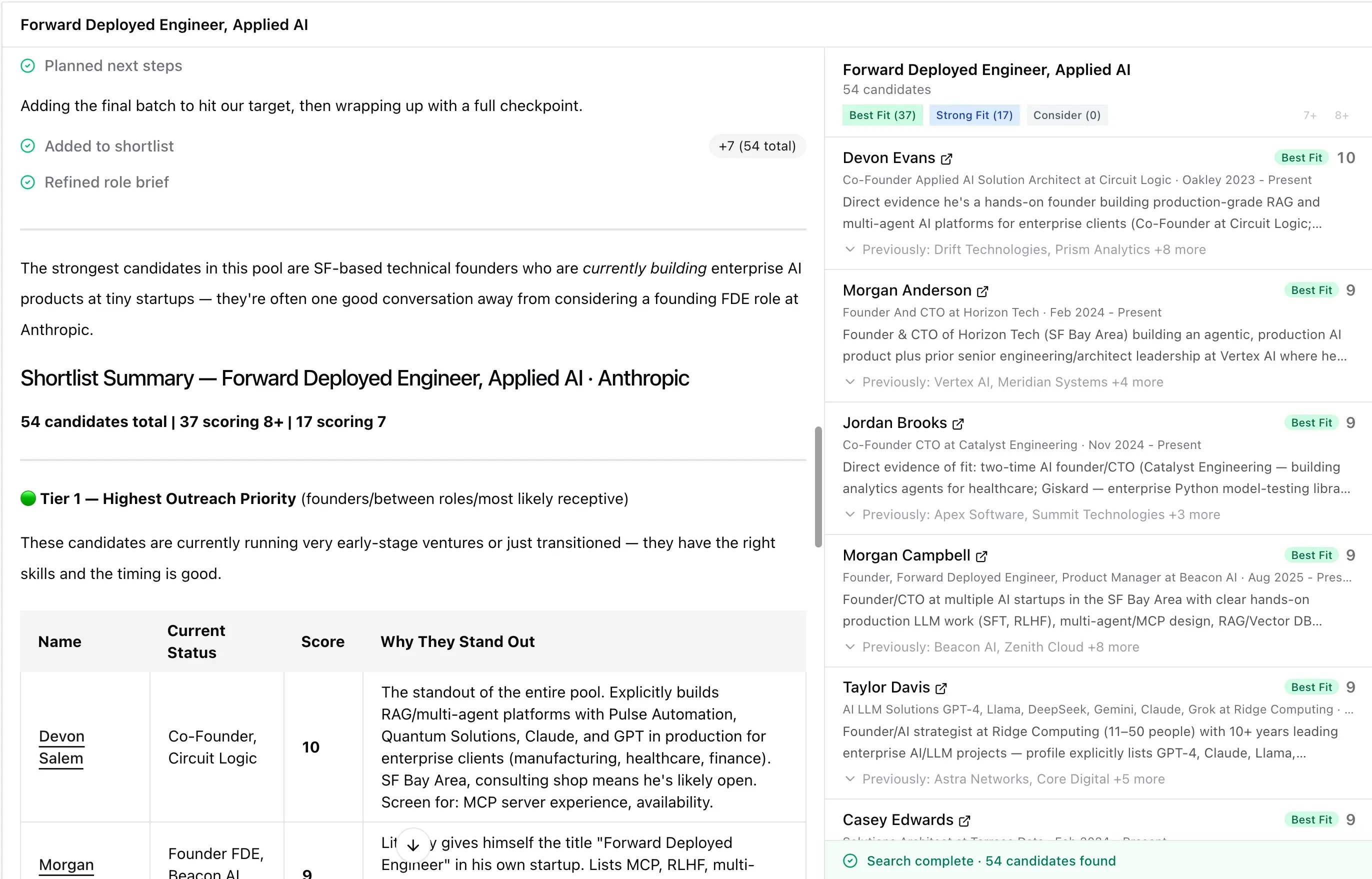 ### AI Outbound Talent Search: Live progress during candidate evaluation
Real-time counters during evaluation ("Scored 5/23") and search expansion ("Processed 3/5 seeds").
### Onboarding: Try Nova without connecting an ATS
Skip the ATS connection and go straight to AI Outbound Sourcing. 2 trial searches per month.
### AI Outbound Talent Search: Intake context for better searches
Paste hiring manager notes or intake call transcripts before starting a search. The agent uses this for sharper calibration questions.
### AI Outbound Talent Search: Rate candidate assessments
Thumbs up/down on each candidate's fit rating. Feedback is saved and included in CSV exports.
### AI Outbound Talent Search: Collaborative intake before searching
The agent asks clarifying questions before searching when the job description is ambiguous: must-have experience, location flexibility, deal-breakers.
### AI Outbound Talent Search: Receptivity scoring
Assessments now factor in receptivity signals: recent role changes, short tenure, lateral moves. Surfaces in the scoring rationale, not as a separate score.
### AI Outbound Talent Search: Faster shortlist filtering
One-click fit chips and minimum score filter in the sidebar.
### AI Outbound Talent Search: Clearer candidate cards and richer CSV export
Cards prioritize summary and structured work history. CSV exports include current and previous role/company columns.
### AI Outbound Talent Search: Conversational search with follow-up messages
Send follow-up messages to refine results after the first batch. The agent picks up with full context from prior rounds.
### AI Outbound Talent Search: Smarter scoring for hard-to-evidence criteria
Requirements unlikely to appear on LinkedIn profiles (budget ownership, process governance) are flagged as phone-screen verification items instead of penalizing candidates.
### Talent Pool: ATS context in search explanations
Explanations now include application answers, recruiter notes, and rejection details. Available for Teamtailor, Greenhouse, Ashby, Workable, and Pinpoint.
### Fraud Detection: Stronger LinkedIn reasoning
Richer LinkedIn profile context for better reasoning on identity coherence and claim consistency.
### Fraud Detection: Filter by job posting
Filter the dashboard by specific job postings. The "Jobs" dropdown is searchable by title and ID, and shows assessment count per role.
### Fraud Detection: Customer-facing dashboard
Review fraud risk assessments in Nova: summary by risk level, visual trends, date filtering, and detail dialogs. Only visible when Fraud Detection is enabled.
### AI Outbound Talent Search: Live progress during candidate evaluation
Real-time counters during evaluation ("Scored 5/23") and search expansion ("Processed 3/5 seeds").
### Onboarding: Try Nova without connecting an ATS
Skip the ATS connection and go straight to AI Outbound Sourcing. 2 trial searches per month.
### AI Outbound Talent Search: Intake context for better searches
Paste hiring manager notes or intake call transcripts before starting a search. The agent uses this for sharper calibration questions.
### AI Outbound Talent Search: Rate candidate assessments
Thumbs up/down on each candidate's fit rating. Feedback is saved and included in CSV exports.
### AI Outbound Talent Search: Collaborative intake before searching
The agent asks clarifying questions before searching when the job description is ambiguous: must-have experience, location flexibility, deal-breakers.
### AI Outbound Talent Search: Receptivity scoring
Assessments now factor in receptivity signals: recent role changes, short tenure, lateral moves. Surfaces in the scoring rationale, not as a separate score.
### AI Outbound Talent Search: Faster shortlist filtering
One-click fit chips and minimum score filter in the sidebar.
### AI Outbound Talent Search: Clearer candidate cards and richer CSV export
Cards prioritize summary and structured work history. CSV exports include current and previous role/company columns.
### AI Outbound Talent Search: Conversational search with follow-up messages
Send follow-up messages to refine results after the first batch. The agent picks up with full context from prior rounds.
### AI Outbound Talent Search: Smarter scoring for hard-to-evidence criteria
Requirements unlikely to appear on LinkedIn profiles (budget ownership, process governance) are flagged as phone-screen verification items instead of penalizing candidates.
### Talent Pool: ATS context in search explanations
Explanations now include application answers, recruiter notes, and rejection details. Available for Teamtailor, Greenhouse, Ashby, Workable, and Pinpoint.
### Fraud Detection: Stronger LinkedIn reasoning
Richer LinkedIn profile context for better reasoning on identity coherence and claim consistency.
### Fraud Detection: Filter by job posting
Filter the dashboard by specific job postings. The "Jobs" dropdown is searchable by title and ID, and shows assessment count per role.
### Fraud Detection: Customer-facing dashboard
Review fraud risk assessments in Nova: summary by risk level, visual trends, date filtering, and detail dialogs. Only visible when Fraud Detection is enabled.
 ### Criteria Builder: Understand why candidates received their score
Paste a candidate's ATS URL into the chat to see their score breakdown and which criteria influenced the result.
### Fraud Detection: Cross-candidate matching on phone and LinkedIn
Duplicate detection now checks phone numbers and LinkedIn profiles alongside email. Catches the same person submitting under different names.
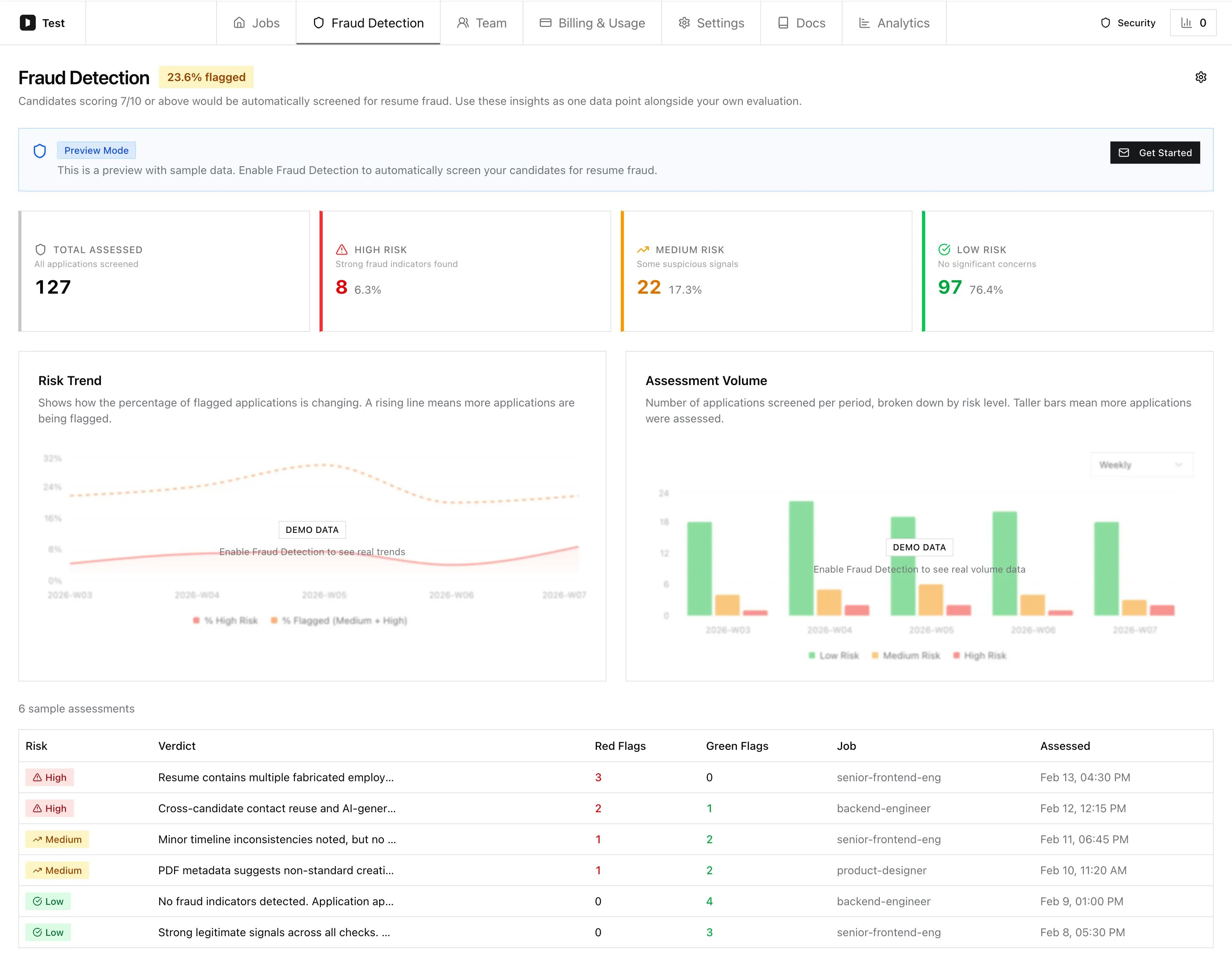
### Fraud Detection: Recruiter-friendly risk notes
Clearer language for ATS workflows. Consistent structure: risk, takeaway, top reasons, reassuring signs.
### Criteria Builder: Understand why candidates received their score
Paste a candidate's ATS URL into the chat to see their score breakdown and which criteria influenced the result.
### Fraud Detection: Cross-candidate matching on phone and LinkedIn
Duplicate detection now checks phone numbers and LinkedIn profiles alongside email. Catches the same person submitting under different names.
### Fraud Detection: Recruiter-friendly risk notes
Clearer language for ATS workflows. Consistent structure: risk, takeaway, top reasons, reassuring signs.
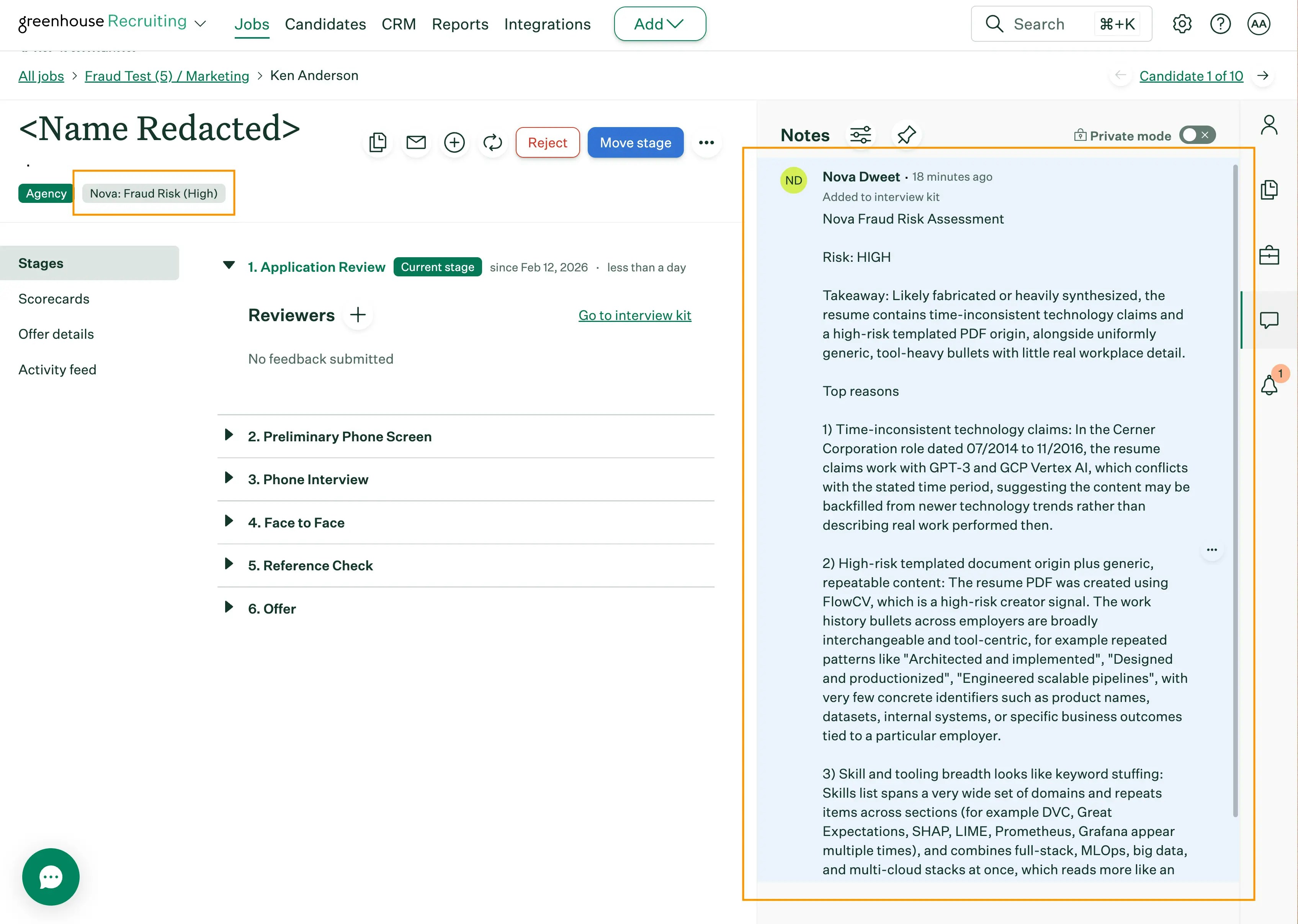 ### Fraud Detection: Hidden content and keyword stuffing detection
Detects invisible keyword lists, tiny text, and overlapping text layers in resume PDFs. Factored into fraud risk.
### AI Talent Search: Usage limits
5 searches per 30-day rolling window per company (default). The search button shows current usage. Failed searches don't count. Contact support to adjust.
### Jobs Dashboard: Cleaner, denser job list
Two-line row layout with all actions in an overflow menu.
### Fraud Detection: Multi-layered resume fraud analysis
Production-ready. Combines text analysis with external validation: timeline integrity, career plausibility, skill credibility, document metadata, email/identity verification, LinkedIn validation, and cross-candidate duplicates.
Over 93% precision at the recommended threshold. Zero false positives at highest confidence. Only runs on candidates at or above your score threshold (default: 7/10). [Learn more](/nova/features/fraud-detection).
### Talent Pool: Compact search results layout
Denser layout. Roughly 2 more candidate rows visible without scrolling.
### Criteria Builder: Calibration matrix view
Table view of all candidates and criteria in a grid. Click any name for full details.
### Scoring: Smarter must-have evaluation
Nova uses resume evidence directly instead of defaulting to interview checks. If a role requires 5+ years and the resume shows 3, that gap is reflected in the score. Interview verification is reserved for must-haves where the resume is silent.
Scoring is also more role-specific: a strong IC applying to a management role is evaluated against management requirements.
### Criteria Builder: More stable calibration re-runs
Re-runs keep prior evaluations for unchanged criteria. Score changes focus on what you actually edited.
### Scoring: Better handling of missing resume details
Missing detail is treated as uncertainty, not automatic failure. Plausible but unconfirmed must-haves are marked partial with targeted interview checks.
### Talent Pool: Simpler indexing pipeline
Simplified discovery and indexing flow with inline resume extraction. Removes legacy batch queue complexity.
### Talent Pool: Filter by allowed job postings
Select specific job postings to include. Only candidates from selected jobs get indexed. Leave empty to include all.
### Calibration: Evidence-based feedback from real resumes
### Fraud Detection: Hidden content and keyword stuffing detection
Detects invisible keyword lists, tiny text, and overlapping text layers in resume PDFs. Factored into fraud risk.
### AI Talent Search: Usage limits
5 searches per 30-day rolling window per company (default). The search button shows current usage. Failed searches don't count. Contact support to adjust.
### Jobs Dashboard: Cleaner, denser job list
Two-line row layout with all actions in an overflow menu.
### Fraud Detection: Multi-layered resume fraud analysis
Production-ready. Combines text analysis with external validation: timeline integrity, career plausibility, skill credibility, document metadata, email/identity verification, LinkedIn validation, and cross-candidate duplicates.
Over 93% precision at the recommended threshold. Zero false positives at highest confidence. Only runs on candidates at or above your score threshold (default: 7/10). [Learn more](/nova/features/fraud-detection).
### Talent Pool: Compact search results layout
Denser layout. Roughly 2 more candidate rows visible without scrolling.
### Criteria Builder: Calibration matrix view
Table view of all candidates and criteria in a grid. Click any name for full details.
### Scoring: Smarter must-have evaluation
Nova uses resume evidence directly instead of defaulting to interview checks. If a role requires 5+ years and the resume shows 3, that gap is reflected in the score. Interview verification is reserved for must-haves where the resume is silent.
Scoring is also more role-specific: a strong IC applying to a management role is evaluated against management requirements.
### Criteria Builder: More stable calibration re-runs
Re-runs keep prior evaluations for unchanged criteria. Score changes focus on what you actually edited.
### Scoring: Better handling of missing resume details
Missing detail is treated as uncertainty, not automatic failure. Plausible but unconfirmed must-haves are marked partial with targeted interview checks.
### Talent Pool: Simpler indexing pipeline
Simplified discovery and indexing flow with inline resume extraction. Removes legacy batch queue complexity.
### Talent Pool: Filter by allowed job postings
Select specific job postings to include. Only candidates from selected jobs get indexed. Leave empty to include all.
### Calibration: Evidence-based feedback from real resumes
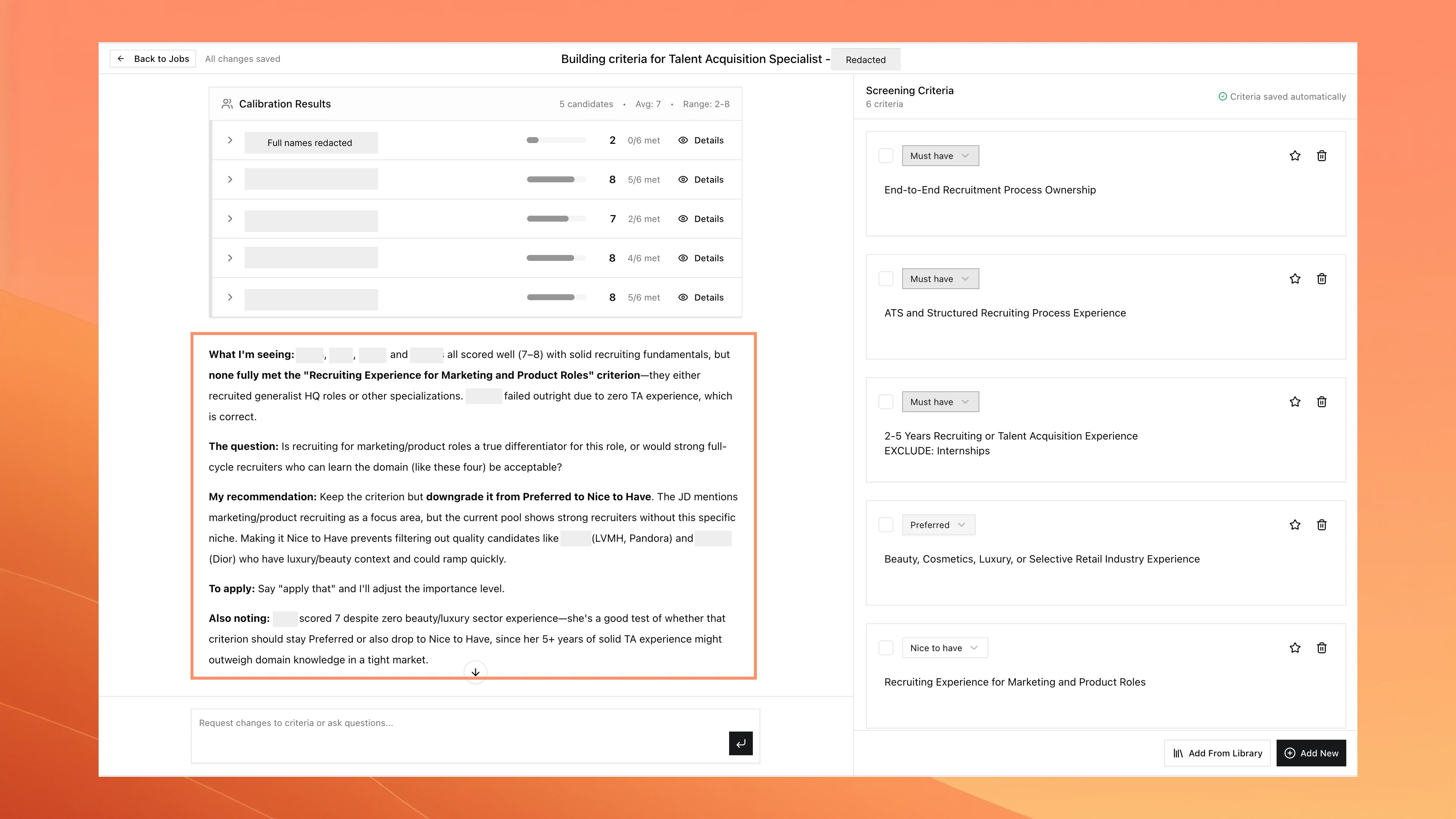 Calibration now references actual resume details and gives concrete recommendations.
### Integrations: High potential stage automation
Auto-advance high-scoring candidates to a "High Potential" stage. Combine with low potential automation for full triage. Available for Lever, Greenhouse, and Nova ATS.
### Talent Pool: Indexing analytics
Total indexed candidates, success rates, queue health, and progress per job.
### Criteria Builder: Improved error handling and retry
Fixed the builder getting stuck on loading if the background task failed. Clear error with a "Retry" button.
### Criteria Builder: Add intake context before question generation
Paste intake call notes, transcripts, or hiring manager requirements before question generation.
Calibration now references actual resume details and gives concrete recommendations.
### Integrations: High potential stage automation
Auto-advance high-scoring candidates to a "High Potential" stage. Combine with low potential automation for full triage. Available for Lever, Greenhouse, and Nova ATS.
### Talent Pool: Indexing analytics
Total indexed candidates, success rates, queue health, and progress per job.
### Criteria Builder: Improved error handling and retry
Fixed the builder getting stuck on loading if the background task failed. Clear error with a "Retry" button.
### Criteria Builder: Add intake context before question generation
Paste intake call notes, transcripts, or hiring manager requirements before question generation.
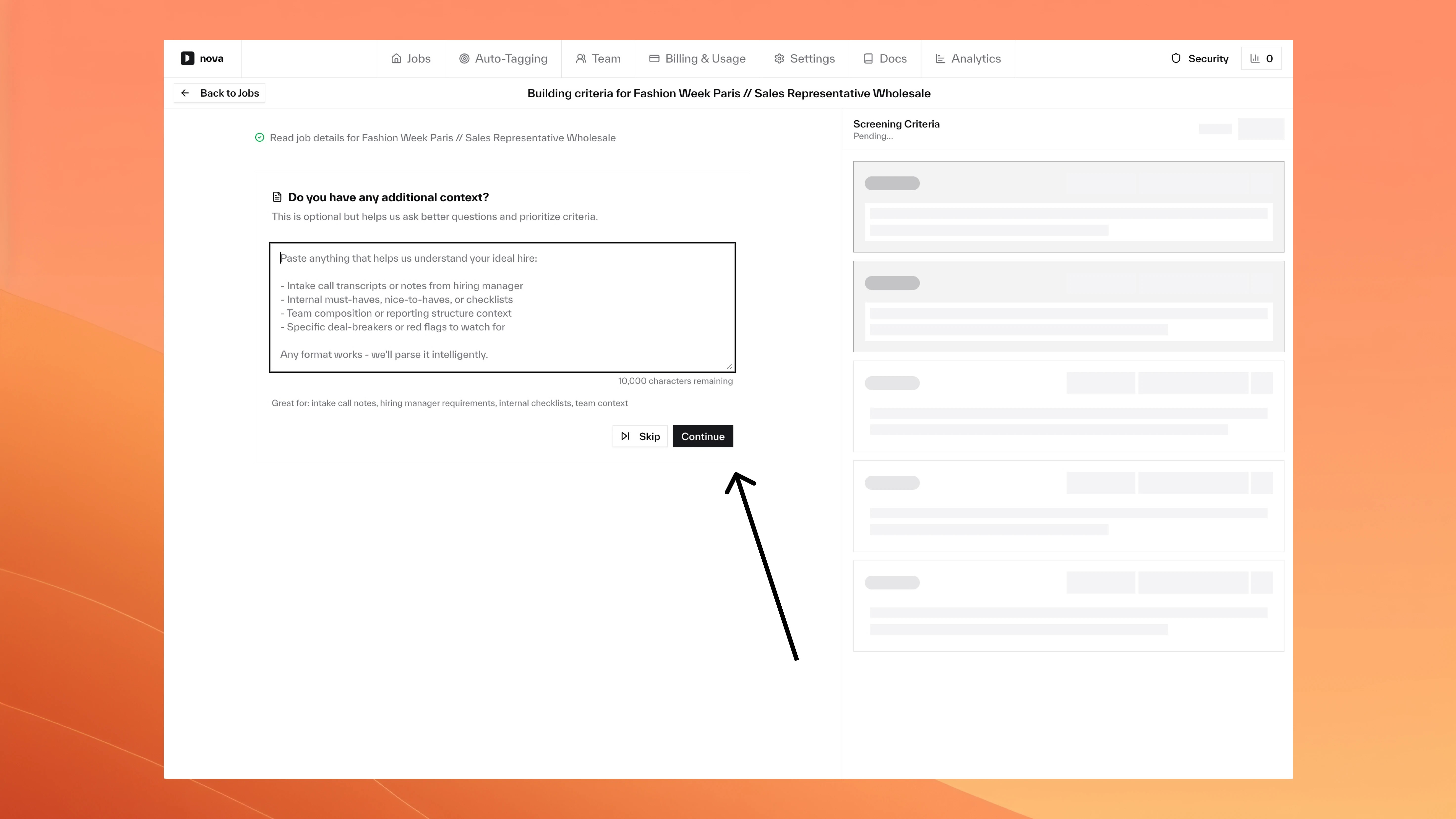 ### Calibration: Test criteria with your own resumes
Upload up to 5 resume files (PDF, DOC, DOCX) alongside ATS candidates during calibration.
### Calibration: Test criteria with your own resumes
Upload up to 5 resume files (PDF, DOC, DOCX) alongside ATS candidates during calibration.
### Criteria Builder: Clear next steps when criteria are ready
Two options: start screening immediately, or test with calibration first.
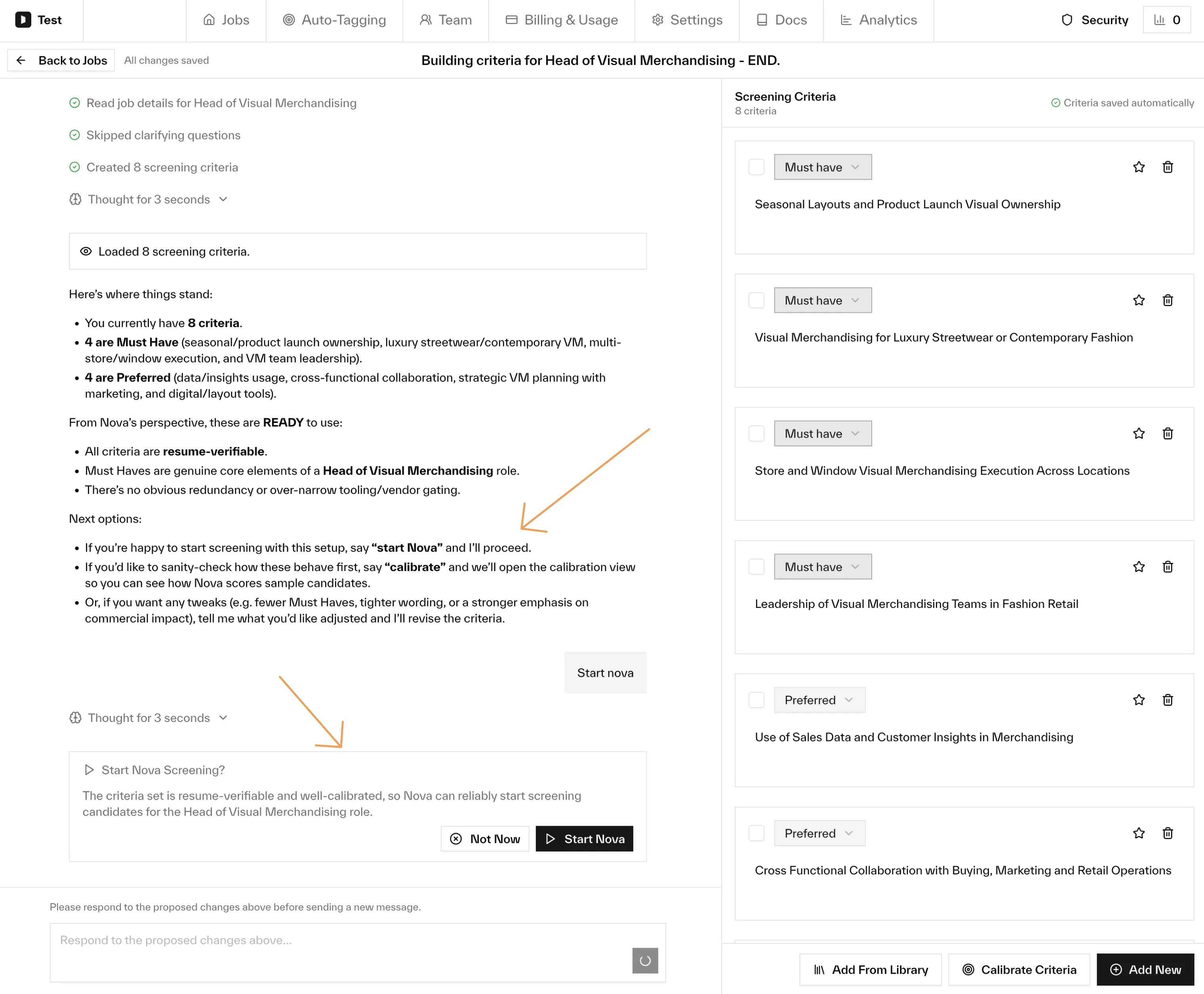 ### Criteria Builder: Edit criteria inline
Click importance to change it, or click into text to edit. Saves automatically.
### Scoring: Quick feedback on Nova's scores
"Agree" and "Disagree" links on each scored candidate note in your ATS. Feedback is tied to specific scoring runs.
### Criteria Builder: Leaner, smarter criteria
Concise titles with structure only where it's not obvious. Auto-merges overlapping requirements.
**Before:**
> **Collection Merchandising Experience**
### Criteria Builder: Edit criteria inline
Click importance to change it, or click into text to edit. Saves automatically.
### Scoring: Quick feedback on Nova's scores
"Agree" and "Disagree" links on each scored candidate note in your ATS. Feedback is tied to specific scoring runs.
### Criteria Builder: Leaner, smarter criteria
Concise titles with structure only where it's not obvious. Auto-merges overlapping requirements.
**Before:**
> **Collection Merchandising Experience**
> Experience working with fashion collections from concept to completion. Must have worked on seasonal RTW collections at a luxury fashion house.
**After:**
> **Collection Merchandising, Buying, or Styling Experience**
> Exclude: retail store management or visual merchandising-only roles
### Criteria Builder: More natural setup questions
Questions now feel like a recruiter conversation. Your answers directly shape how strict or flexible the generated criteria are.
### Criteria Builder: Personalized guidance on open
Nova scans your criteria and highlights quick improvement opportunities.
### Criteria Builder: Expert recommendations
When Nova suggests multiple options, it recommends one with clear reasoning.
### Criteria Builder: Recover from errors without losing progress
Network issues show a Retry button. No need to start over.
### Settings: Resume-only scoring mode
Score based solely on resumes, ignoring application answers (which are increasingly AI-written). Enable in Company Settings.
### Criteria Library: Save and reuse criteria across jobs
Save criteria to your company library and reuse them across any job. Thanks to [Mike Bradshaw](https://www.linkedin.com/in/itsmikebradshaw) for the feature request!
[Learn more](/nova/features/configuring-criteria#criteria-library)
### Criteria Builder: Auto-sorted criteria
Criteria sort by importance: Must Have, Preferred, Nice to Have.
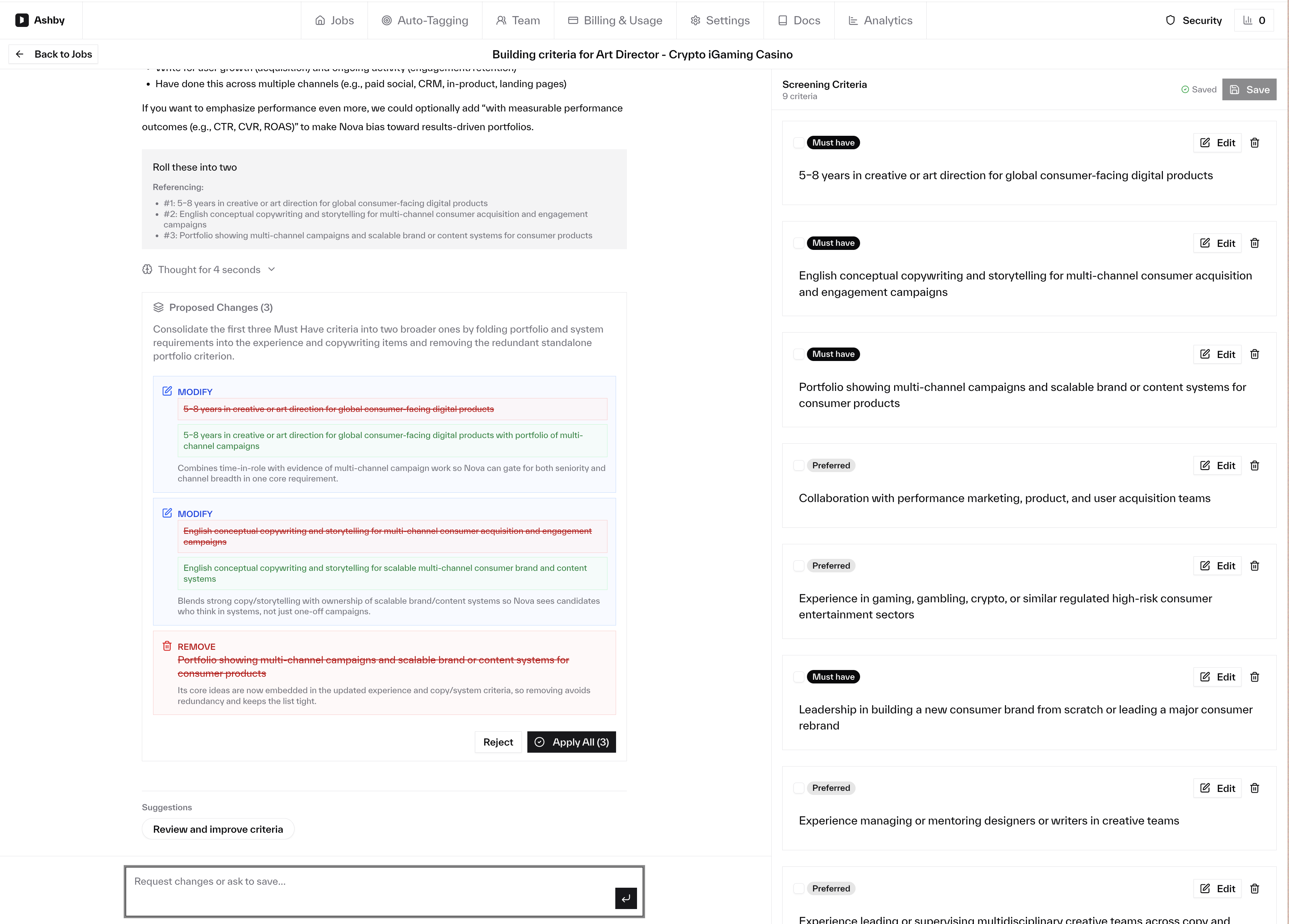
### Criteria Builder: Review multiple changes at once
All proposed changes in a single card with before-and-after diffs. Approve all or reject with feedback.
 ### Talent Pool: Candidates from adjacent career paths
Search now surfaces candidates from related paths (e.g., Communications and PR backgrounds for a Marketing Coordinator search).
### Application fraud detection (beta)
Nova analyzes highly-scored applications for fraud: timeline inconsistencies, impossible claims, and suspicious patterns flagged in the ATS note.
### Criteria Builder V2: Conversational criteria creation
Build screening criteria through conversation. Describe what you want, refine, adjust. Auto-saved.
### Jobs: Smoother search filter clearing
Clearing the search filter no longer flickers.
### Analytics: Date range selection for monthly charts
Range selector on Applications and Candidates Created Per Month charts.
### Jobs: Faster loading for companies with many jobs
The Jobs page now loads much faster for large job catalogs.
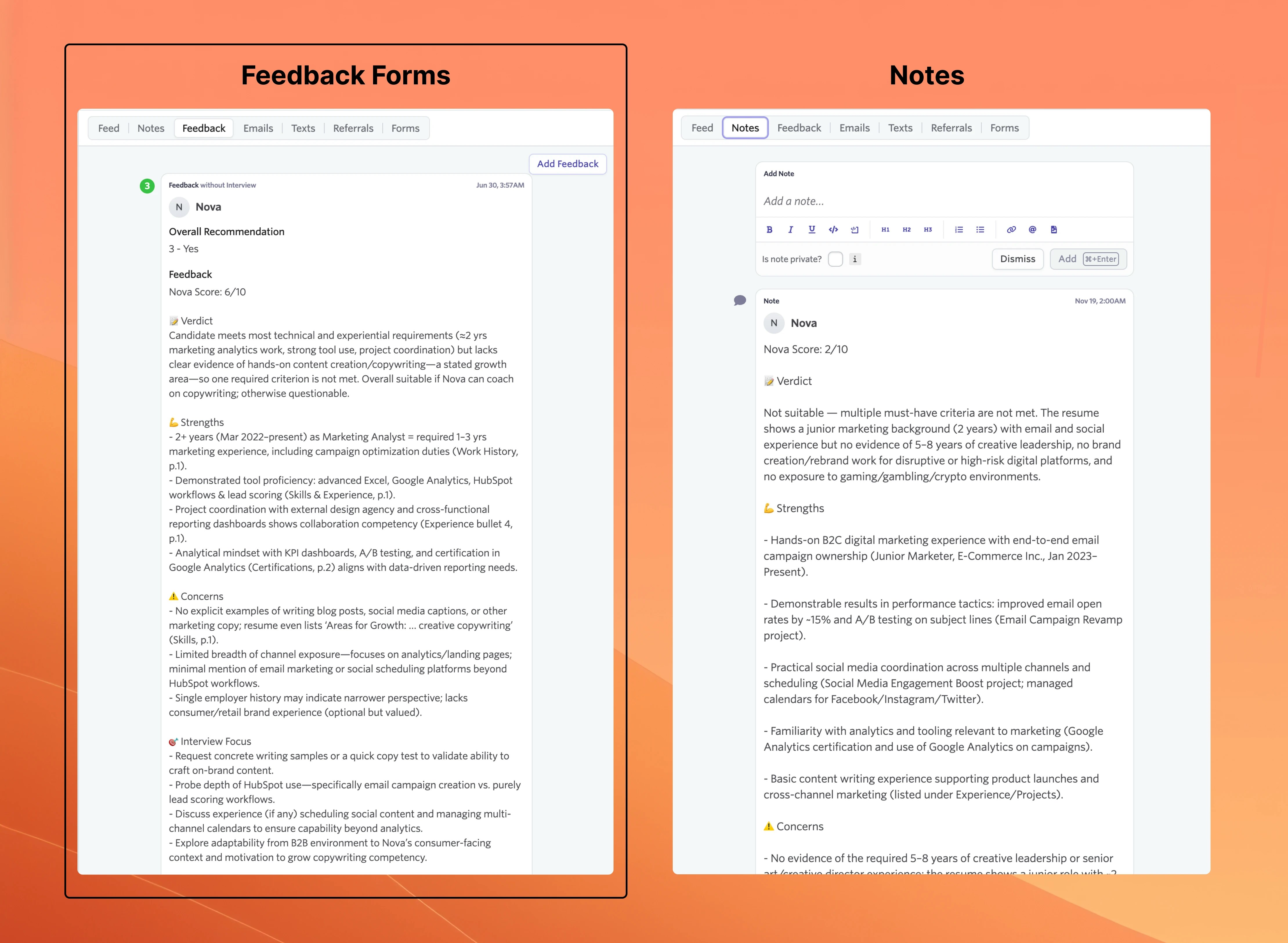
### Ashby Integration: Feedback form setup during onboarding
Choose feedback forms or notes for assessments, so you don't get unexpected emails when Nova scores candidates.
### Talent Pool: Candidates from adjacent career paths
Search now surfaces candidates from related paths (e.g., Communications and PR backgrounds for a Marketing Coordinator search).
### Application fraud detection (beta)
Nova analyzes highly-scored applications for fraud: timeline inconsistencies, impossible claims, and suspicious patterns flagged in the ATS note.
### Criteria Builder V2: Conversational criteria creation
Build screening criteria through conversation. Describe what you want, refine, adjust. Auto-saved.
### Jobs: Smoother search filter clearing
Clearing the search filter no longer flickers.
### Analytics: Date range selection for monthly charts
Range selector on Applications and Candidates Created Per Month charts.
### Jobs: Faster loading for companies with many jobs
The Jobs page now loads much faster for large job catalogs.
### Ashby Integration: Feedback form setup during onboarding
Choose feedback forms or notes for assessments, so you don't get unexpected emails when Nova scores candidates.
 ### Ashby Integration: Auto-skip hired and archived candidates
Skips scoring for hired or archived candidates, saving credits.
### Security: Sign in button on homepage
Added a "Sign in" button to the Nova homepage.
### Talent Pool: More accurate fit assessments
* **Overqualification detected**: 12+ years for a 3-5 year role now rates Consider, not Best Fit
* **Location preferences respected**: US-based candidate flagged when you specified Latin America
* **Strong candidates not held back**: Small unknowns (timezone not listed) don't penalize Best Fit rating
* **Missing info triggers follow-up**: Profile doesn't mention "startup experience" but doesn't contradict it? Consider, not rejected
### Calibration: Multi-file resume upload
Upload multiple resume files at once for calibration.
### Talent Pool: Email notification when search completes
Email with candidate summary and a direct link to results.
### Talent Pool: See your team's recent searches
Recent searches dropdown shows searches from all team members.
### Criteria Builder: Multi-select clarification questions
Select multiple options for clarification questions.
### Criteria Builder: Improved scrolling and auto-save
Auto-saves on "Continue to edit."
### Resume Upload: Encrypted PDF detection
Detects password-protected PDFs before processing.
### Talent Pool Search: Give feedback on results
Feedback on search results to improve future searches.
### Ashby Integration: Auto-skip hired and archived candidates
Skips scoring for hired or archived candidates, saving credits.
### Security: Sign in button on homepage
Added a "Sign in" button to the Nova homepage.
### Talent Pool: More accurate fit assessments
* **Overqualification detected**: 12+ years for a 3-5 year role now rates Consider, not Best Fit
* **Location preferences respected**: US-based candidate flagged when you specified Latin America
* **Strong candidates not held back**: Small unknowns (timezone not listed) don't penalize Best Fit rating
* **Missing info triggers follow-up**: Profile doesn't mention "startup experience" but doesn't contradict it? Consider, not rejected
### Calibration: Multi-file resume upload
Upload multiple resume files at once for calibration.
### Talent Pool: Email notification when search completes
Email with candidate summary and a direct link to results.
### Talent Pool: See your team's recent searches
Recent searches dropdown shows searches from all team members.
### Criteria Builder: Multi-select clarification questions
Select multiple options for clarification questions.
### Criteria Builder: Improved scrolling and auto-save
Auto-saves on "Continue to edit."
### Resume Upload: Encrypted PDF detection
Detects password-protected PDFs before processing.
### Talent Pool Search: Give feedback on results
Feedback on search results to improve future searches.
 ### Calibration: Better handling of criteria changes
Scoring preserved across re-runs. Clearer feedback when criteria are removed.
### Talent Pool: Exclude already-applied candidates
Filter out candidates who already applied to the job.
### Talent Pool: Preview rediscovery settings
Preview rediscovery gating settings before they take effect.
### Source Insights: Filter by score
Filter candidates by score ranges and view score distribution across sources.
### Settings: Re-invite team members
Re-send invitations for team members who missed previous emails.
### Analytics: Application source insights (beta)
See which recruiting channels produce the most applications.
### Security: Passwordless two-factor authentication
Enable 2FA without requiring a password.
### Criteria Builder: Interactive clarification questions
Asks clarifying questions when job requirements are ambiguous.
### Calibration: Better handling of criteria changes
Scoring preserved across re-runs. Clearer feedback when criteria are removed.
### Talent Pool: Exclude already-applied candidates
Filter out candidates who already applied to the job.
### Talent Pool: Preview rediscovery settings
Preview rediscovery gating settings before they take effect.
### Source Insights: Filter by score
Filter candidates by score ranges and view score distribution across sources.
### Settings: Re-invite team members
Re-send invitations for team members who missed previous emails.
### Analytics: Application source insights (beta)
See which recruiting channels produce the most applications.
### Security: Passwordless two-factor authentication
Enable 2FA without requiring a password.
### Criteria Builder: Interactive clarification questions
Asks clarifying questions when job requirements are ambiguous.
 ### Candidate Analytics: Indexed candidate chart
New chart showing the share of indexed candidates over time.
### Talent Search: Geographic proximity boosting
Candidates closer to your job's location rank higher, without filtering out remote candidates.
### Talent Pool: Recent search history
Access recent searches from the jobs table. Dropdown shows last 5 searches per job.
### Talent Pool: Improved search relevance
AI-driven query planner for better ranking and relevance.
### Talent Pool: Configurable lookback date
Custom start date for candidate sync. Overrides the default 24-month lookback.
### Talent Pool: Qualitative fit scoring
Results show qualitative fit assessments instead of numeric scores.
### Calibration: ATS candidate links
Candidates in calibration now link directly to their ATS profiles.
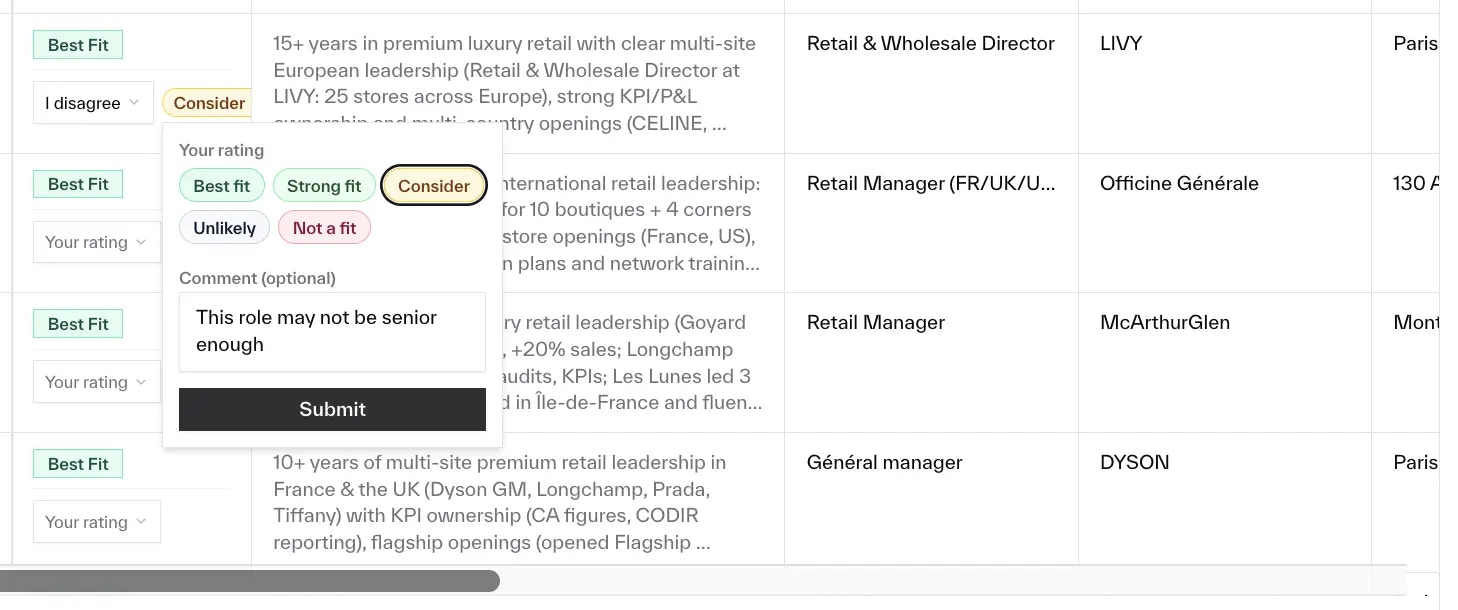
### Calibration: Hiring manager feedback
Hiring managers can validate or challenge Nova's recommendations with structured feedback.
### Calibration: Improved rerun comparison
Easier to see what changed after criteria adjustments.
### Talent Pool: Streaming search results
Results appear progressively and rerank for relevance.
### Talent Pool: Candidate location enrichment
Profiles now include location coordinates and timezone.
### Talent Pool: Improved results design
Redesigned search results with clearer fit indicators.
### Talent Pool: Search from job row
Launch a talent pool search from the jobs table with one click.
### Criteria Builder: Calibration setting
Enable or disable calibration per job.
### Talent Pool: Criteria matrix table
Matrix view for side-by-side candidate comparison against criteria.
### Application Review: Required screening questions
Required screening questions are clearly highlighted on applications.
### Interview Guides: Export PDF
Export interview guides as PDF documents.
### Criteria Builder: Importance levels
Set importance levels for each criterion when building job requirements.
### Job Management: Requisition ID field
Jobs now support a requisition ID field that syncs with your ATS.
### Jobs: Automatic scoring when run limits change
Adjusting run limits now auto-processes pending applications.
### Jobs: Per-job application run limits
Set processing limits per job in Job Settings.
### Jobs: Job ID column in jobs table
Job ID column with tooltips for easier reference.
### Workable Integration: Stage handling guidance
UI now shows notes about how certain hiring stages are handled.
### Jobs: Fixed individual filter clearing
Clear buttons now reset individual filters, not all at once.
### Nova Status: Last synced timestamp
Status tooltips now show when applications were last synced from your ATS.
### Analytics: Combined jobs and applications chart
The analytics dashboard now shows a unified chart with both jobs and applications over time.
### Workable Integration: Configurable rating scale
Workable users can now configure how Nova's scores map to Workable's star rating system.
### Billing: Monthly job creation chart
Added a chart to the billing page showing monthly job creation trends.
### Workable Integration: Stage filtering for candidates
Workable integration now supports filtering candidates by stage.
### Integrations: Improved ATS setup experience
Enhanced the ATS integration setup with clearer instructions and better documentation.
### Criteria Builder: Custom brand specification
You can now specify preferred brands or competitor companies when building criteria.
### Criteria Builder: Retry and skip brand research
You can now retry or skip the brand research step when building criteria.
### Integrations: Smart auto-tagging
AI-powered automatic tagging categorizes candidates in your ATS based on qualifications and experience. Available for TeamTailor and Greenhouse.
### Tags: Auto-generate AI instructions
Automatically generates concise AI instructions for tag configurations.
### Integrations: Shorter shareable job links
Job links now use a cleaner `/l/{code}` format.
### Ashby Integration: Feedback form
Ashby users can now provide feedback through an integrated feedback form.
### Lever Integration: Automatic link shortening
Links shared from Lever are now automatically shortened at creation time.
### Scoring: Brand research integration
Scoring now includes brand research for more relevant candidate evaluations.
### Settings: Assessment language configuration
Configure the output language for assessments at both company and job level.
### Billing: Application processing limits
Each plan now has clear application processing limits with visual usage indicators.
### Lever Integration: Granular assessment scores
Nova now attaches detailed scoring breakdowns to Lever assessments.
### TeamTailor Integration: Application questions
TeamTailor integration now includes candidate responses to application questions in scoring.
### Criteria Builder: Optional intake form
Complete an optional intake form before building criteria for more accurate AI-generated requirements.
### Talent Pool: Search rationale
Search results now include AI-generated rationale explaining candidate rankings.
### Navigation: Documentation link
Added a direct link to Nova's documentation from within the app.
### Scoring: LinkedIn profile enrichment
Nova can now enrich candidate profiles by pulling LinkedIn data for more complete evaluations.
### Navigation: New documentation platform
Migrated to a new documentation platform with improved navigation and changelog.
### Billing: Redesigned billing system
Launched a new billing system with clearer plan tiers and usage tracking.
### Candidate Analytics: Indexed candidate chart
New chart showing the share of indexed candidates over time.
### Talent Search: Geographic proximity boosting
Candidates closer to your job's location rank higher, without filtering out remote candidates.
### Talent Pool: Recent search history
Access recent searches from the jobs table. Dropdown shows last 5 searches per job.
### Talent Pool: Improved search relevance
AI-driven query planner for better ranking and relevance.
### Talent Pool: Configurable lookback date
Custom start date for candidate sync. Overrides the default 24-month lookback.
### Talent Pool: Qualitative fit scoring
Results show qualitative fit assessments instead of numeric scores.
### Calibration: ATS candidate links
Candidates in calibration now link directly to their ATS profiles.
### Calibration: Hiring manager feedback
Hiring managers can validate or challenge Nova's recommendations with structured feedback.
### Calibration: Improved rerun comparison
Easier to see what changed after criteria adjustments.
### Talent Pool: Streaming search results
Results appear progressively and rerank for relevance.
### Talent Pool: Candidate location enrichment
Profiles now include location coordinates and timezone.
### Talent Pool: Improved results design
Redesigned search results with clearer fit indicators.
### Talent Pool: Search from job row
Launch a talent pool search from the jobs table with one click.
### Criteria Builder: Calibration setting
Enable or disable calibration per job.
### Talent Pool: Criteria matrix table
Matrix view for side-by-side candidate comparison against criteria.
### Application Review: Required screening questions
Required screening questions are clearly highlighted on applications.
### Interview Guides: Export PDF
Export interview guides as PDF documents.
### Criteria Builder: Importance levels
Set importance levels for each criterion when building job requirements.
### Job Management: Requisition ID field
Jobs now support a requisition ID field that syncs with your ATS.
### Jobs: Automatic scoring when run limits change
Adjusting run limits now auto-processes pending applications.
### Jobs: Per-job application run limits
Set processing limits per job in Job Settings.
### Jobs: Job ID column in jobs table
Job ID column with tooltips for easier reference.
### Workable Integration: Stage handling guidance
UI now shows notes about how certain hiring stages are handled.
### Jobs: Fixed individual filter clearing
Clear buttons now reset individual filters, not all at once.
### Nova Status: Last synced timestamp
Status tooltips now show when applications were last synced from your ATS.
### Analytics: Combined jobs and applications chart
The analytics dashboard now shows a unified chart with both jobs and applications over time.
### Workable Integration: Configurable rating scale
Workable users can now configure how Nova's scores map to Workable's star rating system.
### Billing: Monthly job creation chart
Added a chart to the billing page showing monthly job creation trends.
### Workable Integration: Stage filtering for candidates
Workable integration now supports filtering candidates by stage.
### Integrations: Improved ATS setup experience
Enhanced the ATS integration setup with clearer instructions and better documentation.
### Criteria Builder: Custom brand specification
You can now specify preferred brands or competitor companies when building criteria.
### Criteria Builder: Retry and skip brand research
You can now retry or skip the brand research step when building criteria.
### Integrations: Smart auto-tagging
AI-powered automatic tagging categorizes candidates in your ATS based on qualifications and experience. Available for TeamTailor and Greenhouse.
### Tags: Auto-generate AI instructions
Automatically generates concise AI instructions for tag configurations.
### Integrations: Shorter shareable job links
Job links now use a cleaner `/l/{code}` format.
### Ashby Integration: Feedback form
Ashby users can now provide feedback through an integrated feedback form.
### Lever Integration: Automatic link shortening
Links shared from Lever are now automatically shortened at creation time.
### Scoring: Brand research integration
Scoring now includes brand research for more relevant candidate evaluations.
### Settings: Assessment language configuration
Configure the output language for assessments at both company and job level.
### Billing: Application processing limits
Each plan now has clear application processing limits with visual usage indicators.
### Lever Integration: Granular assessment scores
Nova now attaches detailed scoring breakdowns to Lever assessments.
### TeamTailor Integration: Application questions
TeamTailor integration now includes candidate responses to application questions in scoring.
### Criteria Builder: Optional intake form
Complete an optional intake form before building criteria for more accurate AI-generated requirements.
### Talent Pool: Search rationale
Search results now include AI-generated rationale explaining candidate rankings.
### Navigation: Documentation link
Added a direct link to Nova's documentation from within the app.
### Scoring: LinkedIn profile enrichment
Nova can now enrich candidate profiles by pulling LinkedIn data for more complete evaluations.
### Navigation: New documentation platform
Migrated to a new documentation platform with improved navigation and changelog.
### Billing: Redesigned billing system
Launched a new billing system with clearer plan tiers and usage tracking.